Microsoft Purview Referential Architecture [Part 2/8]: Classification Engines (MCE vs. DCS), Label Precedence & Unified Catalog Configuration
Part 2 of the Microsoft Purview Architecture Series examines client-side MCE vs. cloud DCS routing across workloads, the OOB SIT boundary on Unified Catalog and on-prem MIP Scanner, unencrypted label DLP design, and verified PowerShell/KQL validation.
In Part 2 of our Microsoft Purview Referential Architecture series, we isolate the foundational layer driving every downstream security policy: Content Classification and Sensitivity Labeling. Two of the costliest mistakes in Purview deployments stem from assuming Advanced Classifiers (Trainable Classifiers, EDM, Fingerprint, or OCR) evaluate identically across every data source, and assuming sensitivity labels must apply RMS encryption before triggering DLP controls.
1. Classification vs. Labeling Split and `MCE` / `DCS` Engine Routing
Detecting "12 credit card numbers" inside a document is strictly a Classification signal—not a protective control. A Sensitivity Label acts as the durable metadata policy marker consumed by DLP, Defender, Copilot, and encryption engines. Crucially, where classification runs determines which classifiers can evaluate at all.
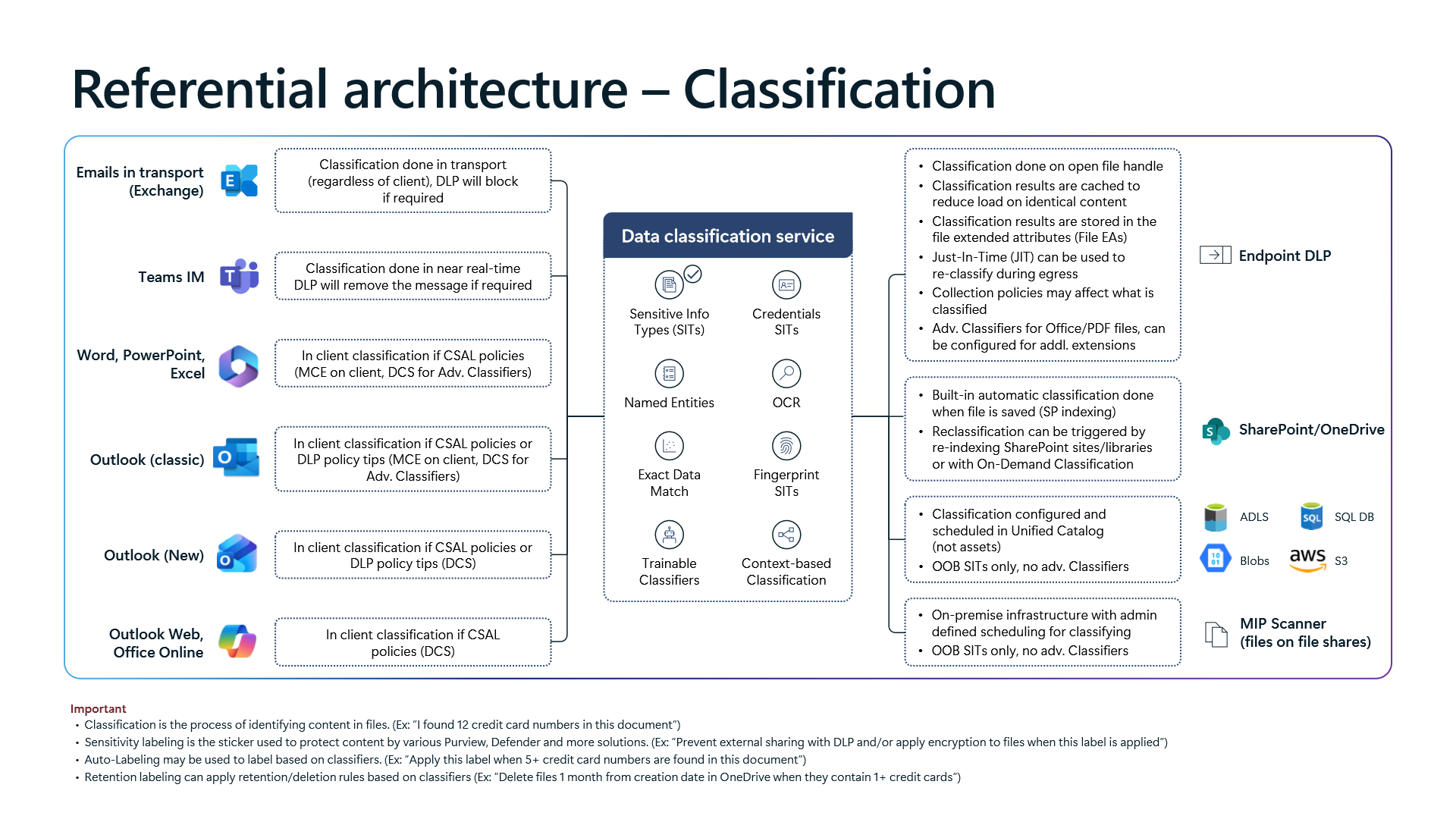
Workload-Specific Classification Behavior and Design Decisions
- `Word`, `PowerPoint`, `Excel`, and `Outlook (classic)` Client Routing: When Client-Side Auto-Labeling (
CSAL) or DLP policy tips are active, primary scanning runs locally on the workstation via the Microsoft Classification Engine (`MCE`). Whenever a rule requires `Trainable Classifiers`, `Exact Data Match (EDM)`, `Fingerprint SITs`, `Named Entities`, `OCR`, or `Context-based Classification`, the client calls the cloud `Data Classification Service` (`DCS`). Configuration guidance: For offline or air-gapped endpoints, never tie critical labels exclusively to Advanced Classifiers—pair them with standard or custom regex/dictionarySITconditions evaluated natively byMCE. - `New Outlook`, `Outlook Web`, and `Office Online`: These web and modern clients do not host local
MCE;CSALand Policy Tip evaluation route directly to cloud `DCS`. This simplifies rule consistency between desktop and browser sessions, while trading off offline pre-send evaluation. - Exchange Transport and Microsoft Teams IM: Exchange classification runs in transport regardless of client, ensuring mobile apps and legacy SMTP senders still pass through
DCSinspection. Teams instant messages evaluate near real-time, removing policy-violating messages shortly after delivery. - SharePoint Online and OneDrive Built-In Classification: Files classify automatically upon save (
SP indexing). However, updating an existingSITor trainable classifier does not retroactively tag dormant repositories unless administrators trigger site/library re-indexing or run `On-Demand Classification`.
Hard Classifier Boundaries on Unified Catalog and On-Premises `MIP Scanner`
Diagram 1 highlights a critical architectural boundary across the bottom-right data stores: Unified Catalog (ADLS, Blobs, SQL DB, AWS S3) and the on-premises `MIP Scanner` for file shares:
- Schedule Inside Unified Catalog Only: Classification for
ADLS,Blobs,SQL DB, andAWS S3must be configured and scheduled inside Unified Catalog—not on individual assets. - Out-of-the-Box (`OOB`) SITs Only: Both Unified Catalog scanning and on-premises
MIP Scannersupport `OOB SITs only, no adv. Classifiers`.EDM,Fingerprint, andTrainable Classifiersreturn zero hits on these repositories by design. Configuration guidance: When scanning S3 buckets, Azure Data Lake, or SMB shares for sensitive records, design detection logic around PurviewOOBSITs or regex/keyword custom SITs supported by the scanner, and test via simulation before enabling auto-labeling.
2. Sensitivity Label Conflict Precedence and Unencrypted DLP Design
Once content is classified, Diagram 2 governs label precedence when multiple rules collide and resolves the most widespread misconception around encryption.
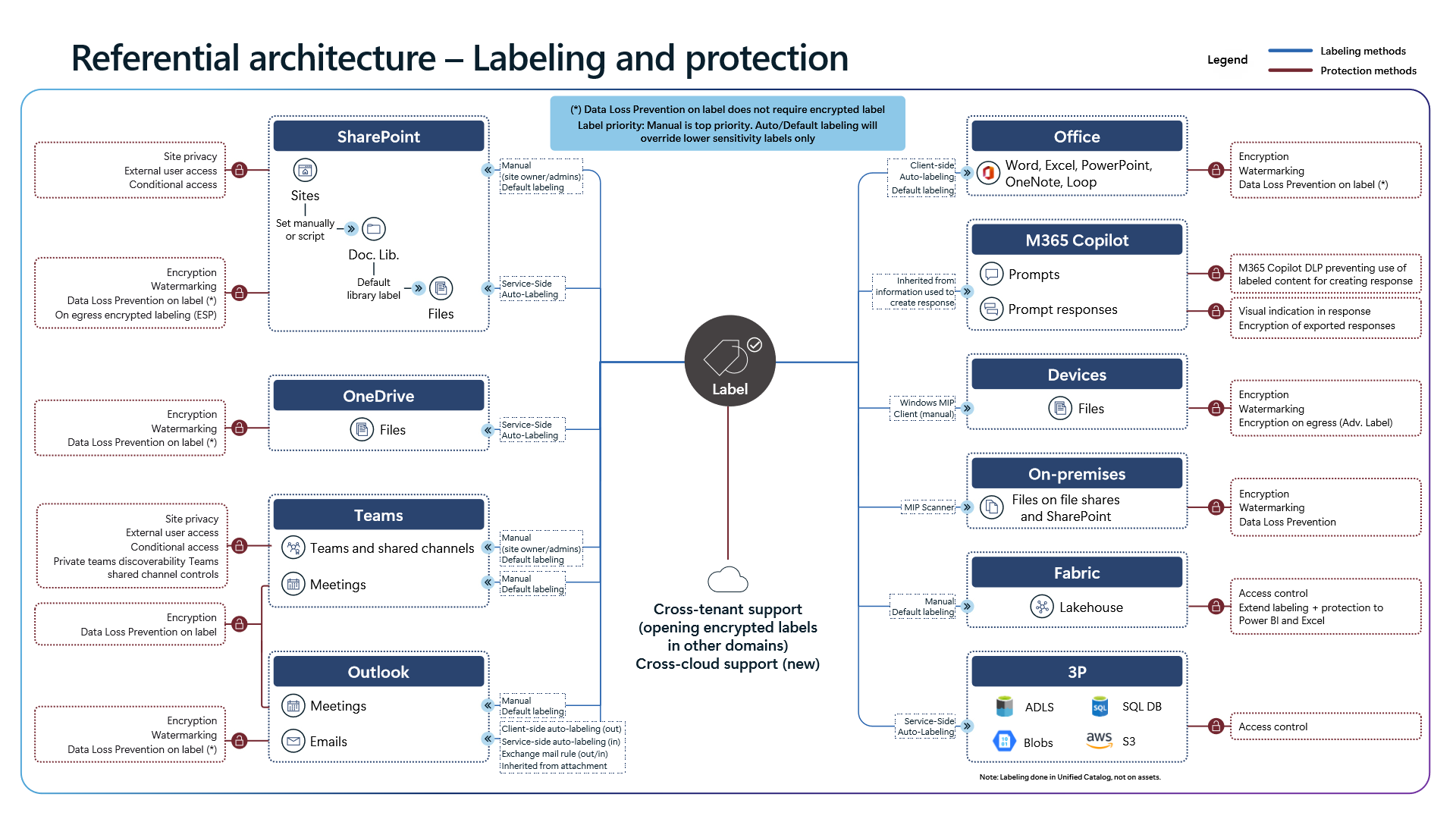
Precedence Mechanics and Policy Configuration
- Manual Label Supremacy: A manual sensitivity label applied by a user always holds `Highest priority`. Neither default label policies nor
CSAL/ service-side auto-labeling can downgrade or overwrite an equal or higher-priority manual label. - Override Only Lower Sensitivity: Default and auto-labeling policies strictly `Override lower sensitivity labels`. Configuration guidance: Order label priorities monotonically in the Microsoft Purview portal from lowest sensitivity (
0: Public / General) to highest (3: Highly Confidential), and double-check that parent/sublabel ordering aligns before turning on automatic labeling. - Mandatory Downgrade Justification: Enable
Require justificationwhen users lower or remove a label; justification text feedsActivity Explorerdirectly for false-positive tuning.
Golden Architectural Rule: DLP Does Not Require Encryption
Enterprise teams often turn on RMS rights encryption across every label under the false assumption that DLP rules otherwise fail to read label metadata. Diagram 2 states explicitly: **(*) Data Loss Prevention on label does not require encrypted label**.
- When to Leave Encryption Off: For internal collaboration tiers (
Confidential - Internal) where your goal is blocking external SharePoint sharing, preventing USB/clipboard egress in Endpoint DLP, or excluding content from Copilot grounding, keep encryption disabled. This preserves native search indexing, DLP inspection speed, version diffing, and backup compatibility. - When to Enable Encryption and Cross-Cloud Scope: Reserve RMS encryption for `Highly Confidential` tiers where access control must persist inside the file bytes after external exfiltration. As confirmed in Diagram 2, encrypted labels now support cross-tenant opening and cross-cloud scenarios. In addition,
Microsoft FabricLakehouse sensitivity labels propagate downstream into Power BI and Excel, while Unified Catalog extends labeling acrossADLS,Blobs,SQL DB, andAWS S3.
3. Pre-Production Hardening Checklist
- Enforce Simulation Gateways: Run every service-side
Auto-labelingpolicy inSimulation mode(TestWithoutNotificationsorTestWithNotifications) for at least7–14 days, reviewing matched sample items before switchingModetoEnable. - Combine `CSAL` and Service-Side Policies: Deploy client-side policies for immediate Office user feedback (
CSAL) while backing them up with SharePoint/OneDrive and Exchange service-side policies for non-Office uploads and external synchronization. - Align Scanners to OOB/Custom SITs: Audit all Unified Catalog (
ADLS,Blobs,SQL DB,S3) and on-premisesMIP Scannerrules to ensure zero dependency onEDMorTrainable Classifiers.
4. Verification via PowerShell and Defender XDR KQL
Inspect active sensitivity label priorities, embedded encryption actions inside LabelActions, and auto-labeling simulation state cleanly via Security & Compliance PowerShell.
# Prerequisite: ExchangeOnlineManagement module installed and Compliance Administrator role active.
# Execution Separation: Inspection commands are read-only; state-changing examples (-WhatIf) must be validated in a pilot group before production rollout.
Connect-IPPSSession

# 1. Inspect sensitivity label order, scope, and whether RMS encryption is configured in LabelActions
Get-Label | ForEach-Object {
    $actions = if ($_.LabelActions) { $_.LabelActions | ConvertFrom-Json } else { @() }
    [PSCustomObject]@{
        DisplayName      = $_.DisplayName
        Name             = $_.Name
        Priority         = $_.Priority
        Disabled         = $_.Disabled
        ContentType      = $_.ContentType
        HasEncryptAction = [bool]($actions | Where-Object { $_.Type -eq "encrypt" })
    }
} | Sort-Object Priority | Format-Table -AutoSize

# 2. Review published label policies, default labels, and justification settings
Get-LabelPolicy | Select-Object Name, Enabled, Mode, Settings | Format-List

# 3. Verify simulation vs. enforcement state and target locations across auto-labeling policies
Get-AutoSensitivityLabelPolicy -DistributionDetail | Select-Object Name, Mode, ExchangeLocation, SharePointLocation, OneDriveLocation, DistributionStatus

# 4. Safely test switching an auto-labeling policy into simulation mode using -WhatIf
Set-AutoSensitivityLabelPolicy -Identity "AutoLabel-Financial-SIT" -Mode TestWithoutNotifications -WhatIf
Monitor label changes, user downgrades, justifications, and label-driven DLP triggers in Defender XDR Advanced Hunting using CloudAppEvents.
// Execution Scope: Read-only hunting query (Defender XDR Advanced Hunting / Log Analytics; requires Security Reader role)
// Data Source: Microsoft Defender XDR Advanced Hunting - CloudAppEvents
CloudAppEvents
| where Timestamp > ago(14d)
| where ActionType in ("DlpRuleMatch", "SensitivityLabelApplied", "SensitivityLabelRemoved", "SensitivityLabelChanged")
| extend Raw = parse_json(tostring(RawEventData))
| extend LabelName = tostring(Raw.SensitivityLabelEventData.SensitivityLabelId),
         OldLabelName = tostring(Raw.SensitivityLabelEventData.OldSensitivityLabelId),
         Justification = tostring(Raw.SensitivityLabelEventData.JustificationText),
         RuleName = tostring(Raw.RuleName),
         UserId = tostring(Raw.UserId)
| project Timestamp, ActionType, Application, UserId, LabelName, OldLabelName, Justification, RuleName
| sort by Timestamp desc
5. Licensing, RBAC, and Engineering Limitations
- Licensing: Manual labeling works under Microsoft 365 E3, whereas Client/Service-Side Auto-Labeling, Trainable Classifiers, `EDM`, `OCR`, and Unified Catalog governance require Microsoft 365 E5 / Microsoft Purview Suite (or eligible Purview PAYG data-map metering).
- RBAC: Assigning
Information Protection AdministratororCompliance Administratoris required to author labels, policies, and auto-labeling rules. - Limitations: Neither
Unified Catalog(ADLS,Blobs,SQL DB,S3) nor on-premisesMIP Scannerexecutes Advanced Classifiers (EDM,Trainable Classifiers). Client-side auto-labeling evaluation timing also diverges between classic Office apps (MCElocal +DCSfallback) andNew Outlook/Outlook Web(DCScloud-only).
Critical Architectural Assessment and Rollback Strategy
- Risks Mitigated vs. Residual Risk Boundary: Aligning
MCE/DCSengines and label priority standardizes classification across M365 workloads, but it does not mitigate detection gaps whereUnified Catalogsources and on-premisesMIP Scannerlack support forEDMand Trainable Classifiers. - New Dependencies and Production Failure Modes: Encryption-enabled labels introduce hard dependencies on Rights Management (
RMS) permissions and monotonic label ordering. Misconfigured priority tiers or inconsistent evaluation paths between classic desktop Office andNew Outlookcan lock out automated workflows or trigger false downgrades. - Rollback and Pilot Validation Procedure: If misclassified encryption disrupts operations, revert policies via
Set-AutoSensitivityLabelPolicy -Mode TestWithoutNotificationsand narrowGet-LabelPolicymandatory scoping while keeping decryption recovery roles ready; always dry-run with-WhatIfin a pilot group first.
Microsoft Purview Referential Architecture 8-Part Series Index
- Part 1: End-to-End Architecture & Cause-and-Effect Chain
- Part 2 (This Article): Classification Engines (
MCEvs.DCS), Label Precedence & Unified Catalog - Part 3: SharePoint & OneDrive DLP: 6 Scenarios, First Guest Access, `DLP Rule Undo` & `UDP`
- Part 4: Endpoint DLP Internals: `SenseCE.exe`, `File EAs`, 30s JIT & Clipboard Limits
- Part 5: Exchange Transport (`DPS -> DCS -> ETR -> DLP`), Policy Tips & `2M` Partial Scan
- Part 6: Browser DLP, BYOD `Edge Work Profile` & `Entra GSA` Network DLP Configuration
- Part 7: `Collection Policies` Pre-Ingestion Gate, `Insider Risk Management` & Adaptive Protection
- Part 8: Microsoft 365 Copilot & Cowork DLP, 7-Layer Oversharing Shield & Storage Mapping
Verified Primary Sources & Open-Source Repositories
This architectural guide was cross-corroborated against the official advisories, Microsoft Learn docs, and open-source PowerShell / KQL repositories below.
- SOURCEtechcommunity.microsoft.com/blog/microsoft-purview-blog/microsoft-pur
- SOURCElearn.microsoft.com/en-us/purview/information-protection
- SOURCElearn.microsoft.com/en-us/purview/apply-sensitivity-label-aut
- SOURCElearn.microsoft.com/en-us/purview/deploy-scanner
- SOURCElearn.microsoft.com/en-us/purview/sensitivity-labels-office-a
Multi-Channel Distribution Summary (X & LinkedIn Draft)
Toggle X (Twitter) & LinkedIn sharing drafts
Multi-Channel Distribution Summary (X & LinkedIn Draft)
Toggle X (Twitter) & LinkedIn sharing draftsMicrosoft Purview Architecture Series [Part 2/8]: Why do Trainable Classifiers produce zero matches on Azure Blob, AWS S3, or MIP Scanner? Deep dive into MCE vs. DCS engines, label precedence, and unencrypted-label DLP configuration. #MicrosoftPurview #MIP #InformationProtection
In Part 2 of our 8-part Microsoft Purview Referential Architecture Series, we dissect classification and sensitivity labeling mechanics: MCE vs. DCS workload routing, Unified Catalog OOB SIT boundaries, label conflict hierarchy, and pre-production PowerShell/KQL validation.