Microsoft Purview Referential Architecture [Part 7/8]: Collection Policies Pre-Ingestion Gate, Insider Risk Trigger Boundaries & Adaptive Protection
Part 7 of the Microsoft Purview Architecture Series examines the 6-stage Collection Policies ingestion funnel (Dropped pre-ingestion), why Device Collection Policies supersede IRM indicator toggles, the mandatory Endpoint Always Audit switch, IRM's High-severity EXO/SPO/OneDrive-only trigger limit, and Adaptive Protection.
One of the sharpest troubleshooting headaches in Microsoft Purview occurs when a team configures Insider Risk Management (IRM) policies with every exfiltration indicator enabled—yet observes zero scored risk alerts for weeks. Almost without exception, one of two architectural gates sits in the way: either upstream `Collection Policies` silently discarded events prior to ingestion (Dropped pre-ingestion), or users never received a qualifying `Triggering Event`. Diagrams 11 and 12 expose every stage of this funnel.
1. `Collection Policies`: The 6-Stage Pre-Ingestion Gate (`Event Gate & Filter`)
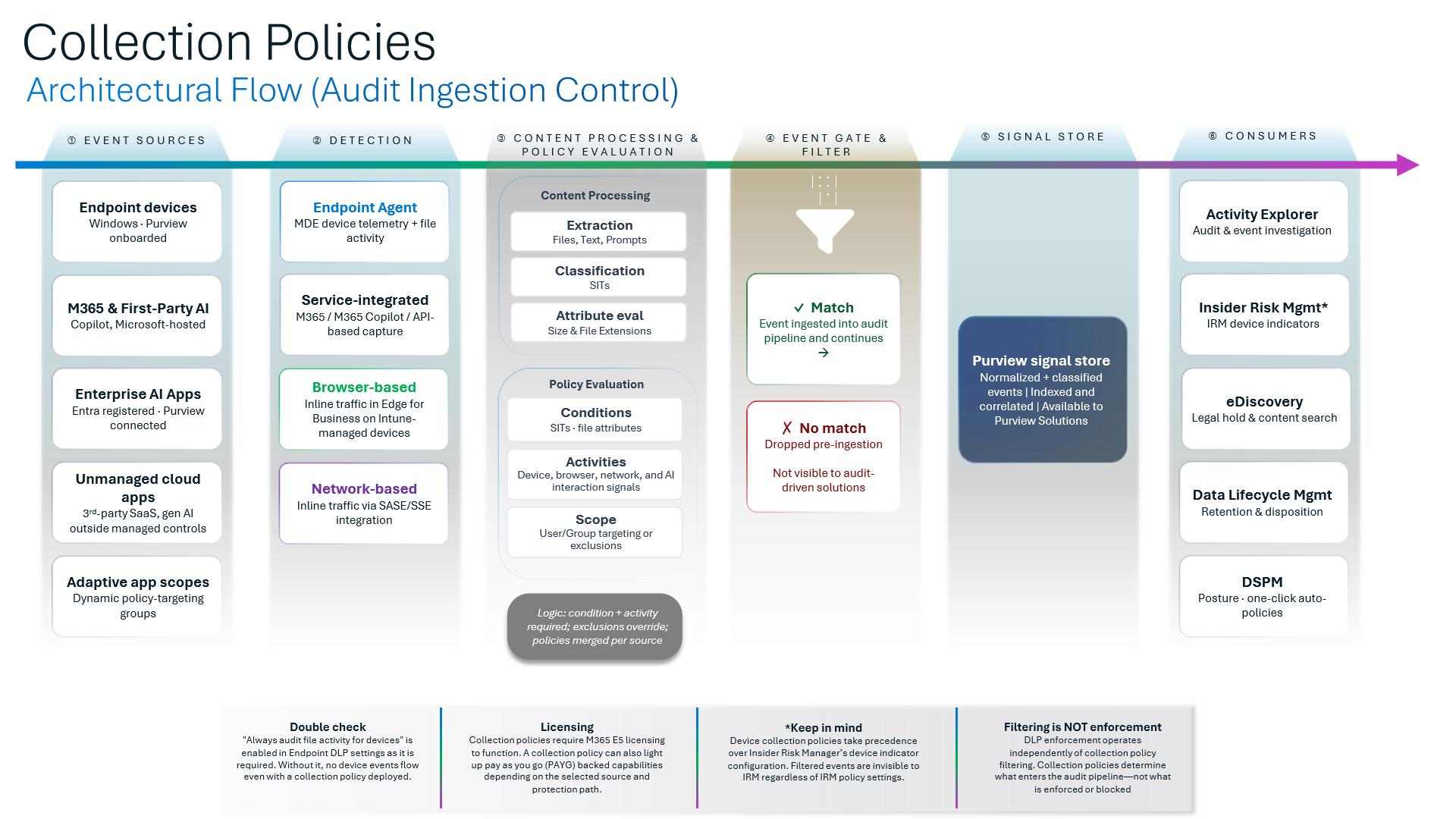
Diagram 11 traces how raw operational signals flow through six stages (Event Sources -> Detection -> Content Processing & Policy Evaluation -> Event Gate & Filter -> Purview Signal Store -> Consumers):
- Stages 1–3 (`Merged per source` Evaluation): Active Collection Policies merge per source; both condition AND activity must match, while exclusions always override inclusions.
- Stage 4 (`Event Gate & Filter` — `Dropped pre-ingestion`): Non-matching telemetry is `Dropped pre-ingestion` before writing to `Purview Signal Store` (Stage 5). Once dropped, those signals never reach downstream `Consumers` (Stage 6:
IRM,DSPM,Activity Explorer, andCommunication Compliance).
Three Crucial Rules Governing Collection Policies
- Rule 1 (`Filtering ≠ Enforcement`): Suppressing signals inside a Collection Policy does not pause or disable DLP blocking actions (
DLP enforcement runs independently). It strictly blinds downstream visibility and analytics consumers. - Rule 2 (Device Collection Policies Override IRM Indicators): Diagram 11 states unambiguously: `Device collection policies take precedence over IRM's device indicator config`. If a scoped Collection Policy omits USB or cloud upload events for a user group, IRM receives zero device telemetry even when every indicator toggle sits checked inside the IRM portal.
- Rule 3 (`Always audit file activity for devices` Prerequisite): `"Always audit file activity for devices"` MUST be turned ON inside Endpoint DLP settings—otherwise zero device events enter Stage 1 at all! Licensing runs primarily via M365 E5, with `PAYG` paths supported depending on workload consumer.
2. Insider Risk Management (`IRM`): The `No Trigger, No Scoring` Law
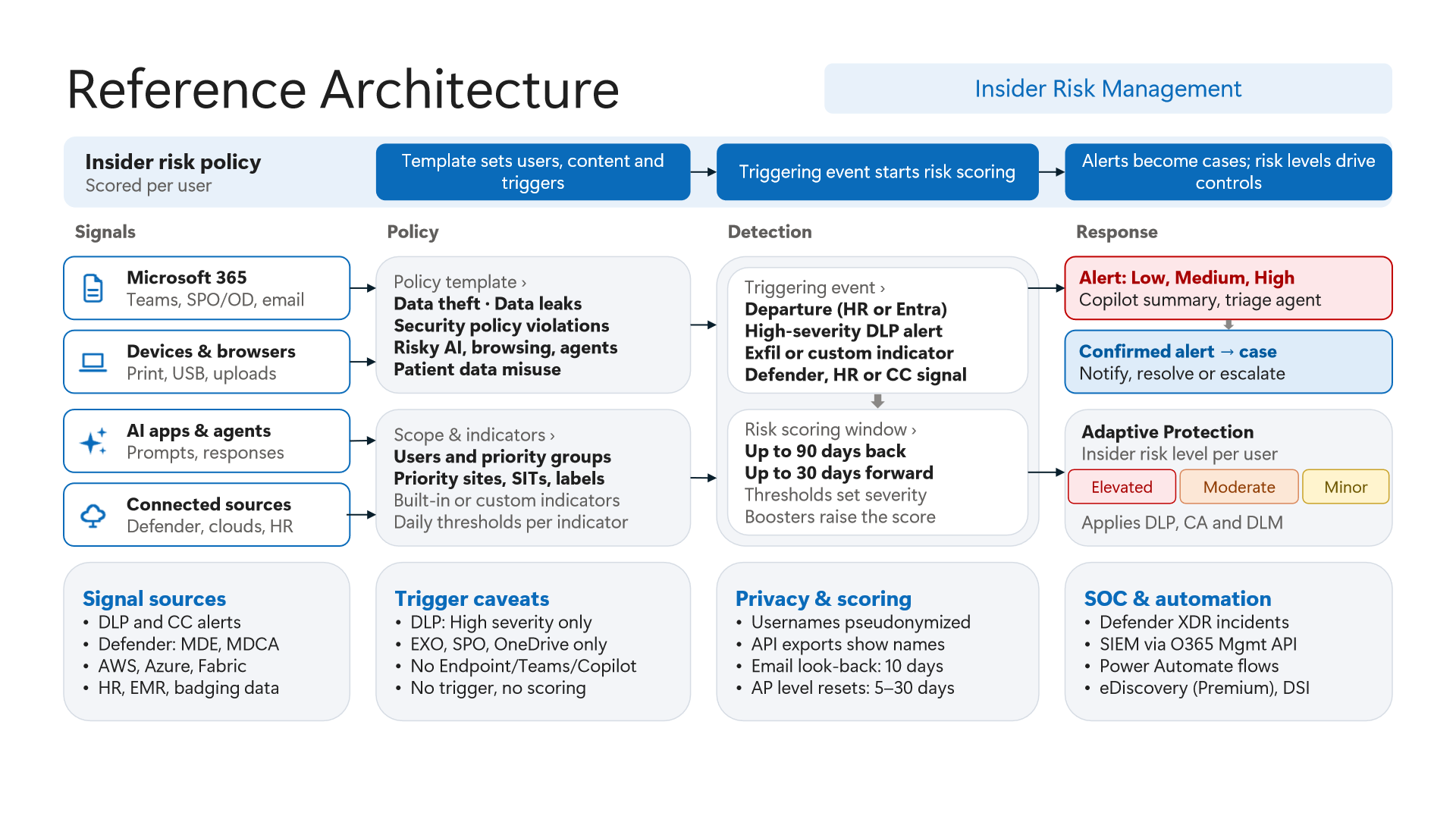
Diagram 12 establishes IRM's cardinal design principle: `No trigger, no scoring`. Until an explicit Triggering Event places an employee in scope, background behavioral telemetry accumulates zero risk score.
- Hidden Boundary on DLP Triggers (`High Severity` and 3 Workloads Only): Architects frequently expect USB blocks in Endpoint DLP or risky Copilot chats to initiate IRM investigation automatically. Diagram 12 confirms otherwise: IRM's built-in DLP triggering event fires strictly on `High severity` alerts from `EXO`, `SPO`, and `OneDrive` only (`No Endpoint/Teams/Copilot`)!
- Architectural Fix (Pair Alternative Triggers): Ensure endpoint and AI exfiltration paths are still scored by combining DLP triggers with `HR Connector` resignation/termination/PIP feeds and `Microsoft Defender for Endpoint` alert triggers so users enter policy scope reliably.
- Asymmetric Scoring Windows & Email Look-Back: Upon trigger, IRM scans `up to 90 days back` and tracks `30 days forward` across behavioral sequences—noting that `Email` look-back caps at `10 days`.
- `Adaptive Protection` Enforcement Loop (`5–30 Days`): Elevated risk tiers (`Minor`, `Moderate`, `Elevated`) automatically escalate DLP restrictions and Conditional Access controls via `Adaptive Protection`, resetting after `5–30 days` of clean activity.
- UI Pseudonymization vs. `API` Exports: Portal workflows keep usernames pseudonymized in the UI to prevent bias, whereas `API exports` expose plain usernames—demanding strict RBAC and data-privacy controls on SIEM/SOAR ingestion pipelines.
3. Verification via PowerShell and Defender XDR KQL
Verify active IRM policies, correlate which high-severity DLP rules qualify as direct IRM triggers (EXO/SPO/OneDrive) vs. those requiring HR/MDE triggers (Endpoint/Teams/Copilot), and inspect CloudAppEvents.
# Prerequisite: ExchangeOnlineManagement installed with Insider Risk Management Admin & Compliance Admin roles.
# Execution Separation: Inspection commands are read-only; state-changing examples (-WhatIf) must be validated in a pilot group before production rollout.
Connect-IPPSSession

# 1. Inspect active Insider Risk Management policies and template assignments
Get-InsiderRiskPolicy | Select-Object Name, IsEnabled, PolicyTemplate, CreatedDate | Format-Table -AutoSize

# 2. Identify active DLP rules generating alerts and map whether workloads qualify as IRM DLP triggers
foreach ($policy in Get-DlpCompliancePolicy) {
    foreach ($rule in (Get-DlpComplianceRule -Policy $policy.Name)) {
        if ($rule.GenerateAlert -and -not $rule.Disabled) {
            [PSCustomObject]@{
                PolicyName       = $policy.Name
                Mode             = $policy.Mode
                RuleName         = $rule.Name
                AlertSeverity    = $rule.GenerateAlert
                ExchangeScoped   = [bool]$policy.ExchangeLocation
                SharePointScoped = [bool]$policy.SharePointLocation
                OneDriveScoped   = [bool]$policy.OneDriveLocation
                EndpointScoped   = [bool]$policy.EndpointDlpLocation
            }
        }
    }
}

# 3. Safely validate simulation mode on an IRM-aligned DLP policy with -WhatIf
Set-DlpCompliancePolicy -Identity "IRM-Trigger-HighSeverity-SPO" -Mode TestWithNotifications -WhatIf
Query CloudAppEvents in Microsoft Defender XDR Advanced Hunting to flag DLP matches originating outside IRM's native DLP trigger workloads (Endpoint, Teams, Copilot) so teams verify secondary HR/MDE trigger coverage.
// Execution Scope: Read-only hunting query (Defender XDR Advanced Hunting / Log Analytics; requires Security Reader role)
// Data Source: Microsoft Defender XDR Advanced Hunting - CloudAppEvents
CloudAppEvents
| where Timestamp > ago(14d)
| where ActionType == "DlpRuleMatch"
| extend Raw = parse_json(tostring(RawEventData))
| extend PolicyName = tostring(Raw.PolicyName),
         RuleName = tostring(Raw.RuleName),
         UserId = tostring(Raw.UserId),
         Workload = Application
| extend QualifiesAsDlpIrmTrigger = iff(Workload in ("Microsoft Exchange Online", "Microsoft SharePoint Online", "Microsoft OneDrive for Business"), "CheckHighSeverity", "RequiresAltTrigger_HR_or_MDE")
| project Timestamp, UserId, Workload, PolicyName, RuleName, QualifiesAsDlpIrmTrigger
| sort by Timestamp desc
4. Licensing, RBAC, and Engineering Limitations
- Licensing:
Collection Policies,Insider Risk Management, `Adaptive Protection`, andCommunication Compliancerequire Microsoft 365 E5 / Microsoft Purview Suite (withPAYGbilling supported on select ingestion paths). - RBAC: Strictly segregate privacy-sensitive `Insider Risk Management`, `Insider Risk Management Analysts`, and `Insider Risk Management Investigators` roles from general DLP/IT administrators.
- Limitations: Disabling
"Always audit file activity for devices"halts device signal collection outright,Device Collection Policiesoverride IRM indicator settings, IRM's DLP trigger excludesEndpoint,Teams, andCopilotDLP events, and API exports reveal non-pseudonymized user identities.
Critical Architectural Assessment and Rollback Strategy
- Risks Mitigated vs. Residual Risk Boundary:
Collection Policies,IRM, andAdaptive Protectiondynamically escalate DLP controls for elevated-risk users, but they do not compensate for disabled"Always audit file activity for devices", non-triggeringEndpoint/Teams/CopilotDLP events, or de-anonymized identity exposure in external API exports. - New Dependencies and Production Failure Modes: Risk scoring relies on accurate
HR Data Connectorfeeds,24–48hanalytics aggregation, and non-conflictingDevice Collection Policies. Stale HR termination timestamps or mis-scoped Collection Policies can either blind IRM indicators completely or lock active engineers into elevatedBlockpolicies. - Rollback and Pilot Validation Procedure: If false risk elevations disrupt users, decouple Adaptive Protection DLP rules back to
TestWithNotifications, keep IRM analytics in read-only investigation mode, and validate Collection Policy filters on a pilot group before widening scope.
Microsoft Purview Referential Architecture 8-Part Series Index
- Part 1: End-to-End Architecture & Cause-and-Effect Chain
- Part 2: Classification Engines (`MCE` vs. `DCS`), Label Precedence & Unified Catalog
- Part 3: SharePoint & OneDrive DLP: 6 Scenarios, First Guest Access, `DLP Rule Undo` & `UDP`
- Part 4: Endpoint DLP Internals: `SenseCE.exe`, `File EAs`, 30s JIT & Clipboard Limits
- Part 5: Exchange Transport (`DPS -> DCS -> ETR -> DLP`), Policy Tips & `2M` Partial Scan
- Part 6: Browser DLP, BYOD `Edge Work Profile` & `Entra GSA` Network DLP Configuration
- Part 7 (This Article):
Collection PoliciesPre-Ingestion Gate,Insider Risk Management& Adaptive Protection - Part 8: Microsoft 365 Copilot & Cowork DLP, 7-Layer Oversharing Shield & Storage Mapping
Verified Primary Sources & Open-Source Repositories
This architectural guide was cross-corroborated against the official advisories, Microsoft Learn docs, and open-source PowerShell / KQL repositories below.
- SOURCEtechcommunity.microsoft.com/blog/microsoft-purview-blog/microsoft-pur
- SOURCElearn.microsoft.com/en-us/purview/collection-policies-learn
- SOURCElearn.microsoft.com/en-us/purview/insider-risk-management
- SOURCElearn.microsoft.com/en-us/purview/insider-risk-management-ada
- SOURCElearn.microsoft.com/en-us/powershell/module/exchange/get-insi
Multi-Channel Distribution Summary (X & LinkedIn Draft)
Toggle X (Twitter) & LinkedIn sharing drafts
Multi-Channel Distribution Summary (X & LinkedIn Draft)
Toggle X (Twitter) & LinkedIn sharing draftsEnabled every USB and upload indicator in IRM yet seeing zero user risk scores? Collection Policies drop events pre-ingestion AND supersede IRM device indicators—and DLP triggers ignore Endpoint, Teams & Copilot! Purview Architecture Series [Part 7/8]. #MicrosoftPurview #IRM #AdaptiveProtection
In Part 7 of our 8-part Microsoft Purview Referential Architecture Series, we analyze the signal ingestion and risk scoring pipeline: the 6-stage Collection Policies gate, silent endpoint audit prerequisites, IRM DLP trigger blind spots, and Adaptive Protection decay windows.