Microsoft Purview Referential Architecture [Part 5/8]: Exchange Transport (DPS -> DCS -> ETR -> DLP), Client Policy Tips Blind Spots & 2M Partial Scan
Part 5 of the Microsoft Purview Architecture Series dissects Outlook client policy-tip divergences across classic, New Outlook, Web, and Outlook Mobile, why pre-send Block generates zero alerts or GIR, the DPS->DCS->ETR->DLP transport order, and partial-scan fault tolerance above 2,000,000 characters.
One of the most frequent confusion points during Exchange DLP rollouts occurs when administrators enforce strict blocking rules yet observe zero entries inside Purview Alerts or Activity Explorer. A close second involves unexpected interactions between custom Exchange Transport Rules (ETR) and downstream Purview DLP rules. Diagrams 6 and 7 of the official referential architecture expose the exact execution mechanics behind both behaviors.
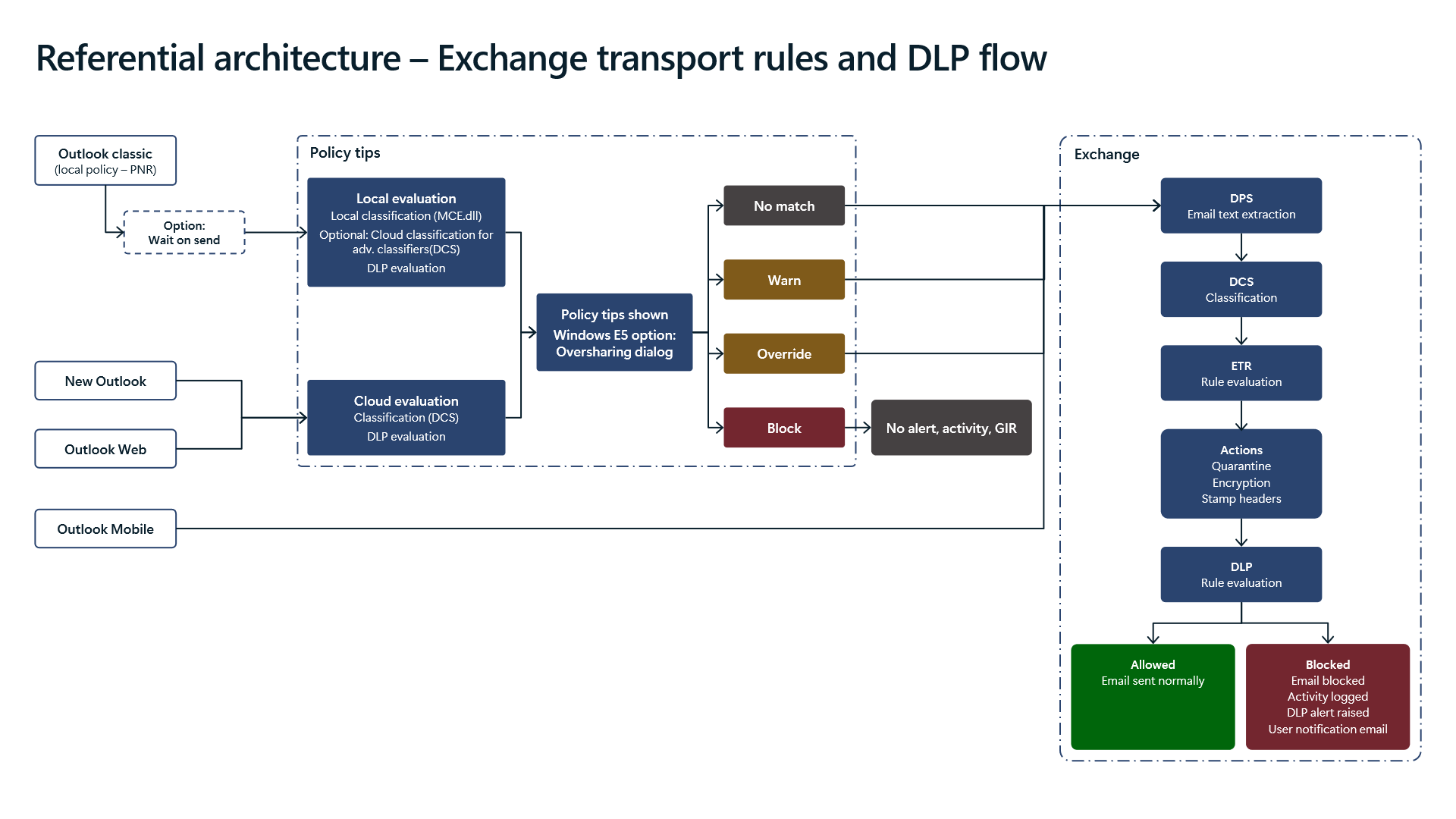
1. Outlook Client Divergence and the Silent `Policy Tips Block` Gap
Diagram 6 maps what runs at the exact moment a user drafts or clicks Send across four Outlook client families:
- `Outlook (classic)` (`PNR` & `Wait on send`): Classic desktop Outlook caches local Policy Notification Rules (
PNR). When enabled, `Wait on send` holds outbound transmission briefly until local evaluation finishes. - `New Outlook` and `Outlook Web` (`DCS` Cloud Query): Modern Outlook and OWA omit local
PNRrule evaluation and invoke cloud `DCS` (`Data Classification Service`) directly for client policy tips. - `Outlook Mobile` Bypasses Policy Tips Completely: `Outlook Mobile` skips Policy Tips entirely, routing messages directly into Exchange Online transport evaluation. Do not rely on client-side user prompts for mobile risk mitigation; mobile enforcement rests exclusively on transport-layer DLP rules.
- Why Client `Block` Produces Zero Alerts (`No alert, activity, GIR`): Look closely at Diagram 6's client block callout: when a Policy Tip (including the Windows E5 `Oversharing dialog`) triggers a hard `Block` pre-send, the message never enters Exchange transport. The architectural consequence: Purview generates ZERO DLP alerts, ZERO Activity Explorer entries, and ZERO `GIR` (`Generate Incident Report`) emails (`No alert, activity, GIR`). Configuration recommendation: Balance user education with SOC visibility by preferring
Block with override(requiring justification) alongside transport-layer enforcement where attempted exfiltration attempts must remain auditable.
2. Strict Transport Pipeline Sequencing: `DPS -> DCS -> ETR -> DLP`
Once a message reaches Exchange Online transport, four distinct subsystems fire in immutable sequence:
- Stage 1 — `DPS` (`Email text extraction`): Extracts message body and attachment payloads into inspectable text streams.
- Stage 2 — `DCS` (`Classification`): Classifies extracted payloads across active SITs and Advanced Classifiers.
- Stage 3 — `ETR` (`Exchange Transport Rules`): Mail flow rules execute Actions—including Quarantine, Encryption (`OME`), and Header Stamping—strictly BEFORE Purview `DLP` rules run. Design caution: If an early
ETRrule encrypts, redirects, or wraps payloads into an unexpected container before Stage 4, downstream DLP rules evaluate the post-ETR message state. - Stage 4 — `DLP` Rule Enforcement: Evaluates rule conditions, enforces blocks or encryption, dispatches
GIRnotifications, and emits full telemetry.
3. The `2,000,000`-Character Ceiling and Partial Scan Fault Tolerance
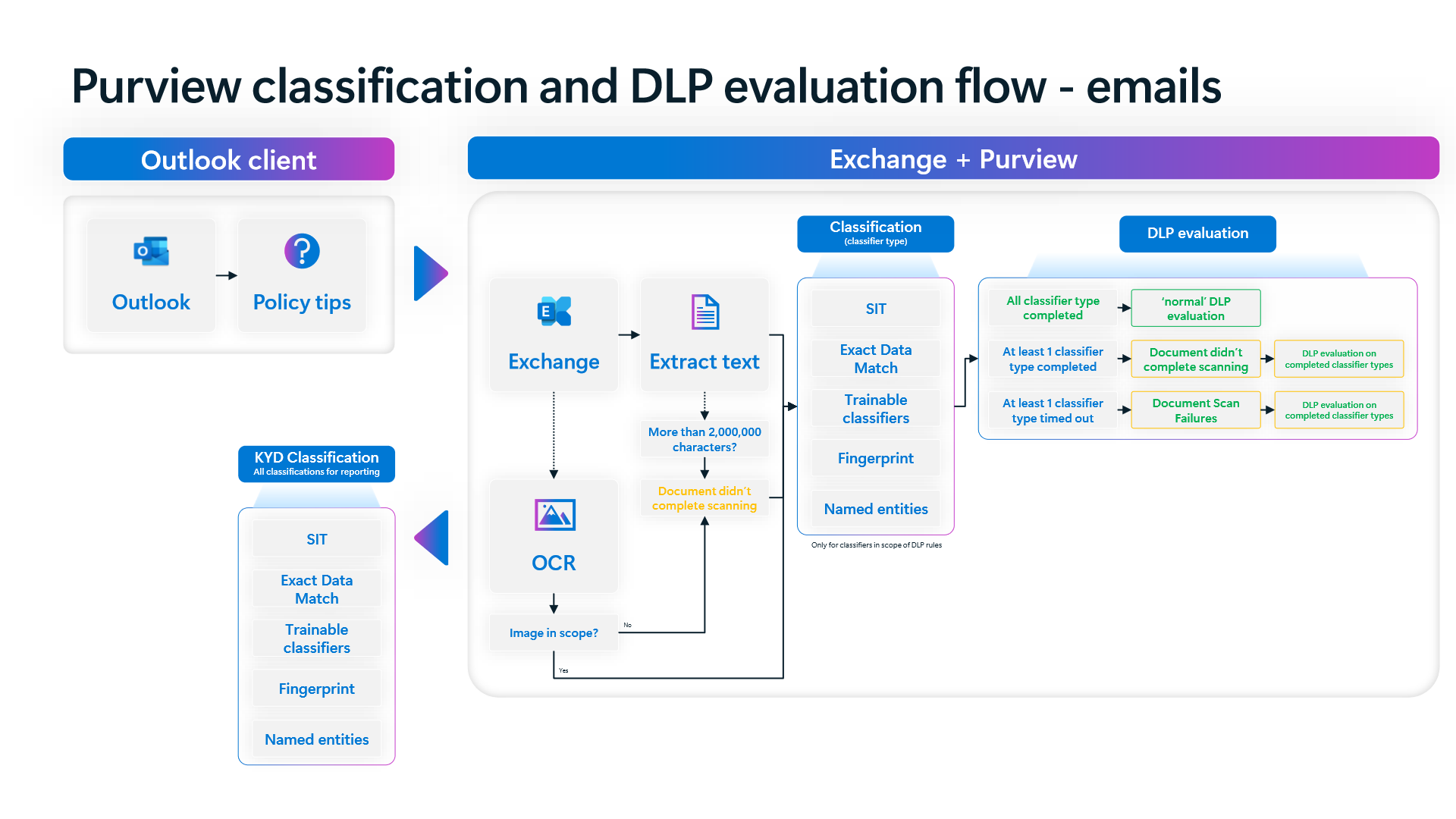
Diagram 7 addresses oversized payloads and classifier timeouts inside the email classification pipeline:
- `2,000,000`-Character Threshold & `OCR`: Emails whose combined body and attachments exceed `2,000,000` characters (incorporating
OCRon scoped images) emit `Document didn't complete scanning`. - Fault-Tolerant Partial Completion: Rather than dropping into naive all-or-nothing fail-open when one complex classifier stalls, Diagram 7 proves that if any classifier times out (
Document Scan Failures) or aborts while at least one other classifier type completes, Purview still runs `DLP evaluation on completed classifier types`. - Closing the Oversized/Unscannable Attachment Gap: Sophisticated insiders can intentionally pad attachments past
2,000,000characters or wrap sensitive files inside encrypted archives to trigger scan timeouts. Pair your sensitive-data policies with dedicated fallback rules checking `Document didn't complete scanning` / uninspectable content conditions for high-risk external recipients. - `DLP` vs. `Know Your Data (KYD)` Scope: `DLP` only runs classifiers explicitly referenced by active rules in scope, whereas `KYD Classification` invokes all classifiers to power tenant discovery reporting.
4. Verification via PowerShell and Defender XDR KQL
Inspect Exchange Transport Rule ordering alongside ApplyOME / Quarantine actions before Exchange DLP runs, and safely test DLP rule adjustments with -WhatIf.
# Prerequisite: ExchangeOnlineManagement module installed with Exchange and Compliance Admin roles.
# Execution Separation: Inspection commands are read-only; state-changing examples (-WhatIf) must be validated in a pilot group before production rollout.
# 1. Inspect Exchange Transport Rules (ETRs) executing ahead of Purview DLP by Priority
Connect-ExchangeOnline
Get-TransportRule | Sort-Object Priority | Select-Object Name, Priority, State, Mode, ApplyOME, Quarantine | Format-Table -AutoSize

# 2. Review Exchange-scoped DLP policies and enforcement/simulation state
Connect-IPPSSession
Get-DlpCompliancePolicy | Where-Object { $_.ExchangeLocation } | Select-Object Name, Mode, ExchangeLocation

# 3. Audit active DLP rules enforcing BlockAccess or generating Incident Reports (GIR)
Get-DlpComplianceRule | Where-Object { $_.BlockAccess -eq $true -or $_.GenerateIncidentReport } | Select-Object Name, ParentPolicyName, Disabled, BlockAccess, GenerateIncidentReport

# 4. Safely simulate updating notification settings on an Exchange DLP rule with -WhatIf
Set-DlpComplianceRule -Identity "EXO-Financial-Outbound-Block" -NotifyUser "SiteAdmin" -WhatIf
Monitor outbound messages in Microsoft Defender XDR Advanced Hunting across EmailEvents and CloudAppEvents to correlate Exchange DlpRuleMatch hits with final delivery outcomes.
// Execution Scope: Read-only hunting query (Defender XDR Advanced Hunting / Log Analytics; requires Security Reader role)
// Data Source: Microsoft Defender XDR Advanced Hunting - EmailEvents & CloudAppEvents
EmailEvents
| where Timestamp > ago(7d)
| where EmailDirection == "Outbound"
| project EmailTime = Timestamp, NetworkMessageId, SenderFromAddress, RecipientEmailAddress, Subject, DeliveryAction, DeliveryLocation, ThreatTypes
| join kind=leftouter (
    CloudAppEvents
    | where Timestamp > ago(7d)
    | where ActionType == "DlpRuleMatch" and Application == "Microsoft Exchange Online"
    | extend Raw = parse_json(tostring(RawEventData))
    | project DlpTime = Timestamp, UserId = tostring(Raw.UserId), PolicyName = tostring(Raw.PolicyName), RuleName = tostring(Raw.RuleName)
) on $left.SenderFromAddress == $right.UserId
| where isnotempty(PolicyName) or DeliveryAction == "Blocked"
| sort by EmailTime desc
5. Licensing, RBAC, and Engineering Limitations
- Licensing: Core Exchange Online DLP and standard ETR rules work under Microsoft 365 E3, whereas Advanced Classifiers, Windows E5 `Oversharing dialog`, `OCR` attachment scanning, auto-labeling, and `Adaptive Protection` require Microsoft 365 E5 / Microsoft Purview Suite.
- RBAC: Inspecting and reordering
ETRrules requiresExchange Administrator; managing Exchange DLP policies and incident reports requiresCompliance AdministratororInformation Protection Administrator. - Limitations: Pre-send hard
Blockactions triggered via client Policy Tips emit zero DLP alerts orGIRlogs (No alert, activity, GIR),Outlook Mobileskips Policy Tips entirely, and payloads exceeding2,000,000characters require explicit unscannable-content rules to prevent size-based evasion.
Critical Architectural Assessment and Rollback Strategy
- Risks Mitigated vs. Residual Risk Boundary: Sequencing
DPS -> DCS -> ETR -> DLPand fault-tolerant partial scanning reduces outbound email leakage, yet it does not cure zero-telemetry client Policy Tip hard blocks, absentOutlook MobilePolicy Tips, or uninspected encrypted archives and payloads exceeding2,000,000characters without fallback rules. - New Dependencies and Production Failure Modes: Evaluation relies on strict
ETRpriority ordering ahead of DLP and consistentOMEhandoffs. Conflicting transport rules or omitted unscannable-content rules create mail-flow delays or silent size-based evasion in production. - Rollback and Pilot Validation Procedure: If mail flow is disrupted, immediately disable offending ETRs via
Disable-TransportRuleor revert Exchange DLP rules toTestWithNotifications, confirming rule priority and-WhatIfbehavior on pilot mailboxes before re-enabling.
Microsoft Purview Referential Architecture 8-Part Series Index
- Part 1: End-to-End Architecture & Cause-and-Effect Chain
- Part 2: Classification Engines (`MCE` vs. `DCS`), Label Precedence & Unified Catalog
- Part 3: SharePoint & OneDrive DLP: 6 Scenarios, First Guest Access, `DLP Rule Undo` & `UDP`
- Part 4: Endpoint DLP Internals: `SenseCE.exe`, `File EAs`, 30s JIT & Clipboard Limits
- Part 5 (This Article): Exchange Transport (
DPS -> DCS -> ETR -> DLP), Policy Tips &2MPartial Scan - Part 6: Browser DLP, BYOD `Edge Work Profile` & `Entra GSA` Network DLP Configuration
- Part 7: `Collection Policies` Pre-Ingestion Gate, `Insider Risk Management` & Adaptive Protection
- Part 8: Microsoft 365 Copilot & Cowork DLP, 7-Layer Oversharing Shield & Storage Mapping
Verified Primary Sources & Open-Source Repositories
This architectural guide was cross-corroborated against the official advisories, Microsoft Learn docs, and open-source PowerShell / KQL repositories below.
- SOURCEtechcommunity.microsoft.com/blog/microsoft-purview-blog/microsoft-pur
- SOURCElearn.microsoft.com/en-us/purview/dlp-exchange-location-learn
- SOURCElearn.microsoft.com/en-us/purview/dlp-policy-tips-reference
- SOURCElearn.microsoft.com/en-us/exchange/security-and-compliance/ma
- SOURCElearn.microsoft.com/en-us/defender-xdr/advanced-hunting-email
Multi-Channel Distribution Summary (X & LinkedIn Draft)
Toggle X (Twitter) & LinkedIn sharing drafts
Multi-Channel Distribution Summary (X & LinkedIn Draft)
Toggle X (Twitter) & LinkedIn sharing draftsWhy do client Policy Tip Blocks leave zero DLP alerts in Purview? Why does Outlook Mobile skip Policy Tips entirely, and how does Exchange handle partial scans past 2,000,000 characters? Purview Architecture Series [Part 5/8]. #MicrosoftPurview #ExchangeOnline #DLP
In Part 5 of our 8-part Microsoft Purview Referential Architecture Series, we analyze Exchange Online email DLP execution: client policy-tip differences, silent pre-send telemetry gaps, strict DPS -> DCS -> ETR -> DLP transport sequencing, and partial classifier completion above 2M chars.