Microsoft Purview Referential Architecture [Part 8/8]: Microsoft 365 Copilot & Cowork Governance — Label Inheritance, 7-Layer Oversharing Shield, Storage & Current DLP
Final installment (Part 8/8) of the Microsoft Purview Architecture Series dissects M365 Copilot & Cowork protection across Diagrams 13–16: sensitivity/encryption inheritance on internal and external files, the 7-layer oversharing stack (Restricted Content Discovery, SAM RAC), all 4 physical storage boundaries, and Copilot DLP rules updated through 11/10/2026.
When an organization enables Microsoft 365 Copilot and Copilot Cowork, one immutable law governs every interaction: generative AI never elevates privileges—it runs `in the user's security context`. Decades of over-permissive SharePoint sharing links, unlabelled attachments, and incomplete retention policies become instantly searchable inside natural-language prompts. Diagrams 13 through 16 of the official referential architecture detail the four structural pillars built to secure Copilot & Cowork.
1. Label and Encryption Inheritance (`Diagram 13`): Tenant and External Files
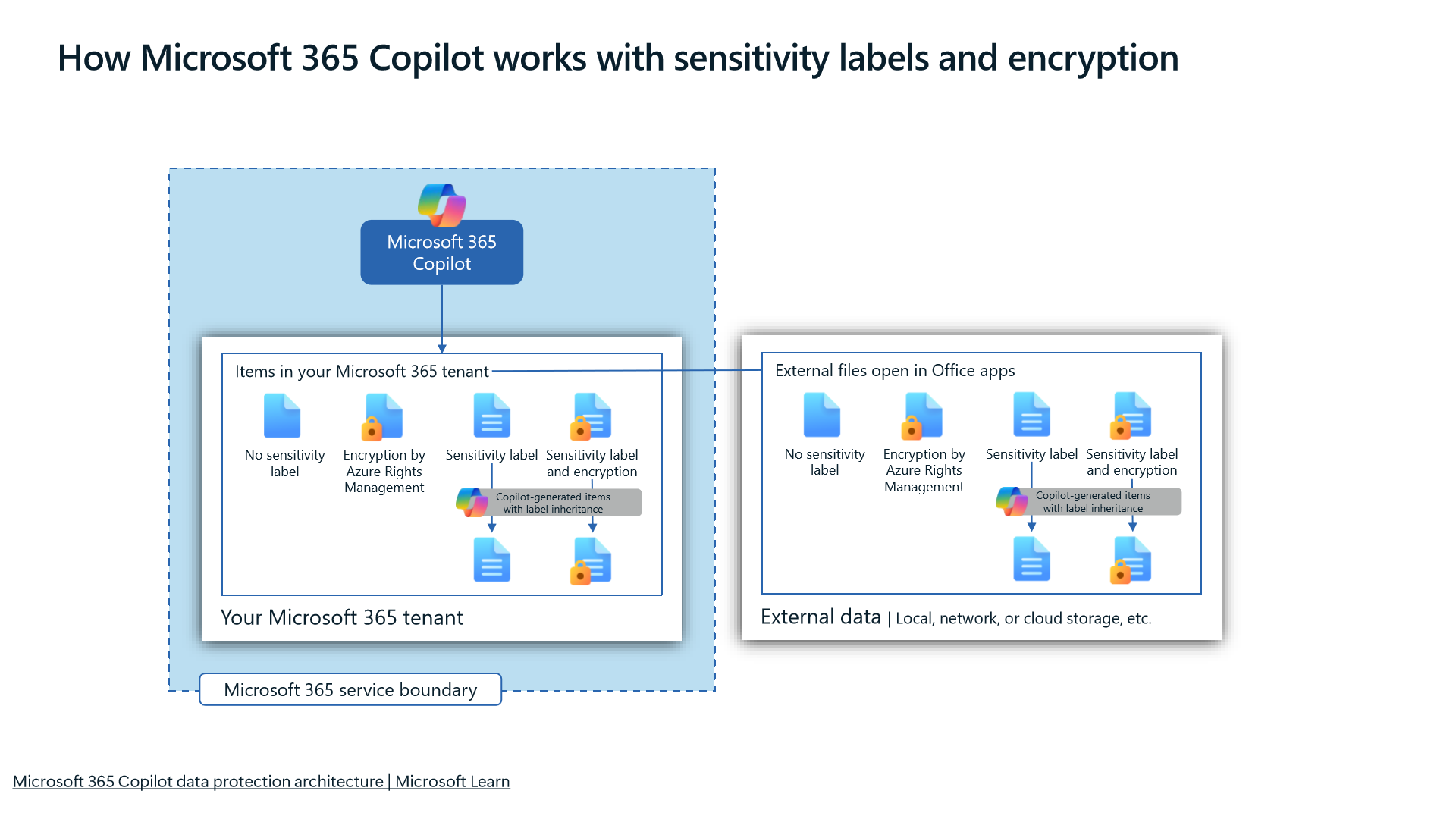
Diagram 13 establishes how Microsoft Purview carries data classification forward rather than losing protection when AI summarizes or drafts content:
- End-to-End Label Propagation: Both internal tenant Microsoft 365 files and external files (`External files`) opened inside Office applications pass their sensitivity labels and encryption onto `Copilot-generated items with label inheritance`.
- Usage Rights Enforcement on Encrypted Items: Whenever source items use RMS rights encryption, Copilot evaluates the requesting user's `EXTRACT` and view rights inside their security context—content lacking extraction rights cannot be synthesized into Copilot answers.
2. Configuring the 7-Layer Oversharing Control Stack (`Diagram 14`)
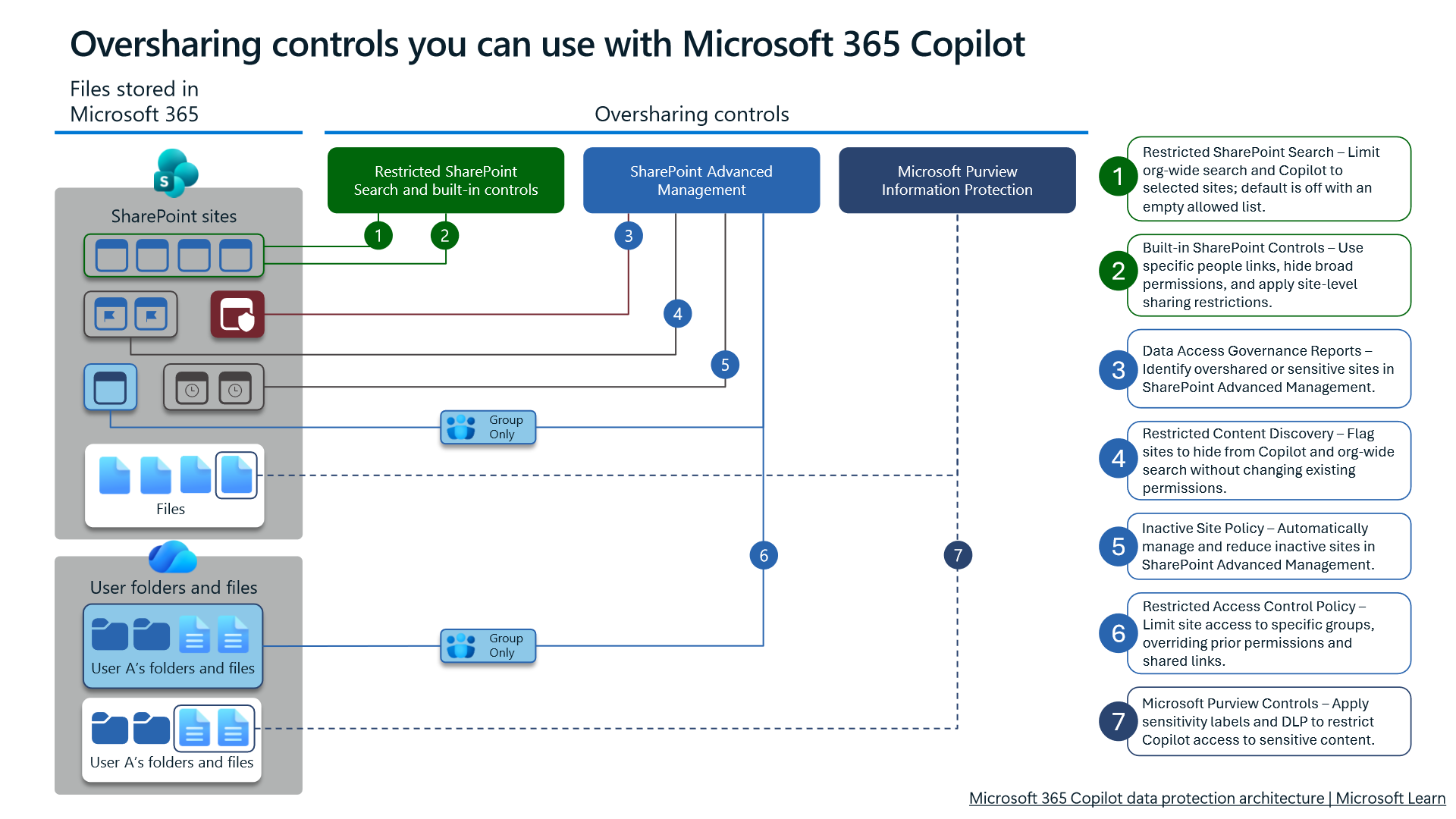
Diagram 14 sequences seven progressive layers (1 -> 7) designed to curb broad permissions without halting business operations:
- Layer 1 — `Restricted SharePoint Search` (`RSS`): Deployment safety brake (
default off / empty). RunningSet-SPOTenantRestrictedSearchMode -Mode Enabledlimits org-wide search and Copilot grounding strictly to a curated allow-list of sites. - Layer 2 — Built-in SharePoint Controls: Audits and removes stale
"Everyone except external users" (EEEU)grants while constraining site creation and sharing defaults. - Layer 3 — `SAM Data Access Governance (DAG)` Reports: Pinpoints sites accumulating risky sharing links or
EEEUpermissions via SharePoint Admin Center DAG dashboards. - Layer 4 — `Restricted Content Discovery` (`RCD`): Runs
Set-SPOSite -Identity <SiteURL> -RestrictContentOrgWideSearch $trueto shield sensitive SharePoint sites from organization-wide search and Copilot grounding without altering or breaking direct file permissions. - Layer 5 — `SAM Inactive Site Policy`: Routes abandoned project sites through automated owner attestation, read-only lock, or archival workflows.
- Layer 6 — `SAM Restricted Access Control (RAC) Policy`: Enforces Entra security/M365 group boundaries directly onto sensitive sites (
Set-SPOSite -RestrictedAccessControl $true -AddRestrictedAccessControlGroups "<Group-GUID>"), guaranteeing that even shared direct links fail unless the user sits in an approved security group. - Layer 7 — Microsoft Purview Labels & DLP: Applies granular document- and prompt-level restrictions. Review Microsoft 365 Copilot Readiness: SharePoint Oversharing and SAM Governance for deep remediation steps.
3. Where Copilot Data Physically Lives and How to Audit It (`Diagram 15`)
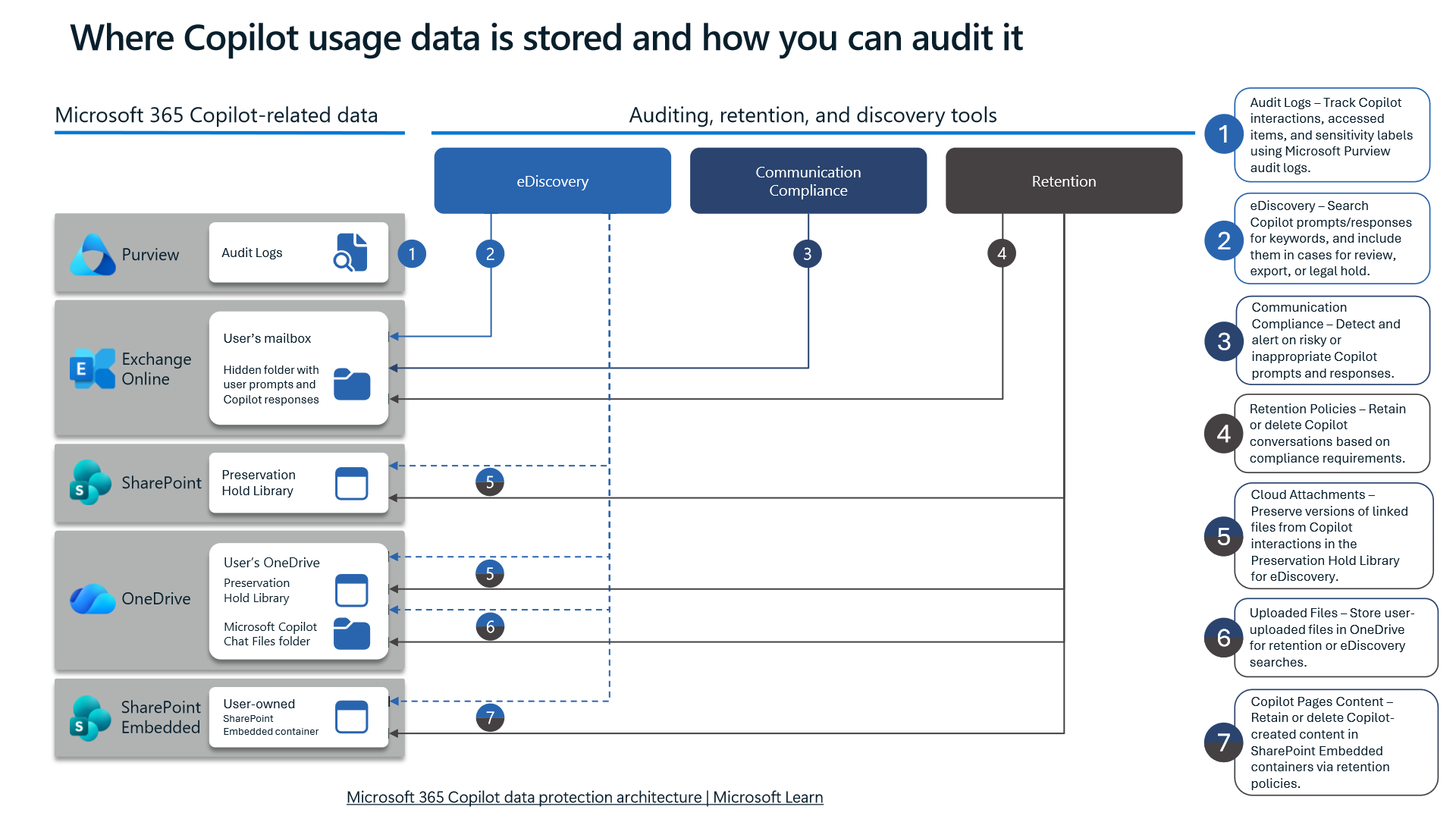
Diagram 15 resolves a persistent compliance blind spot by separating Copilot artifacts into four physical repositories:
- Prompts & Responses -> Hidden Folder in Exchange Online Mailbox: User prompts and Copilot responses reside inside a hidden folder in the user's Exchange Online mailbox. Consequently, `eDiscovery`, `Communication Compliance`, and EXO `Retention Policies` MUST scope user mailboxes to capture Copilot prompt telemetry.
- Linked Cloud Attachments -> `Preservation Hold Library`: Cloud files referenced/linked during sessions retain preservation snapshots inside SharePoint/OneDrive `Preservation Hold Library`.
- Uploaded Chat Files -> OneDrive `Microsoft Copilot Chat Files`: Files uploaded directly from local endpoints into chat are stored in the user's OneDrive folder named `Microsoft Copilot Chat Files`.
- Copilot Pages -> `SharePoint Embedded Container`: Collaborative Copilot Pages reside inside a user-owned `SharePoint Embedded container`.
4. Configuring `DLP for Microsoft 365 Copilot & Cowork` (`Diagram 16` — Updated 11/10/2026)
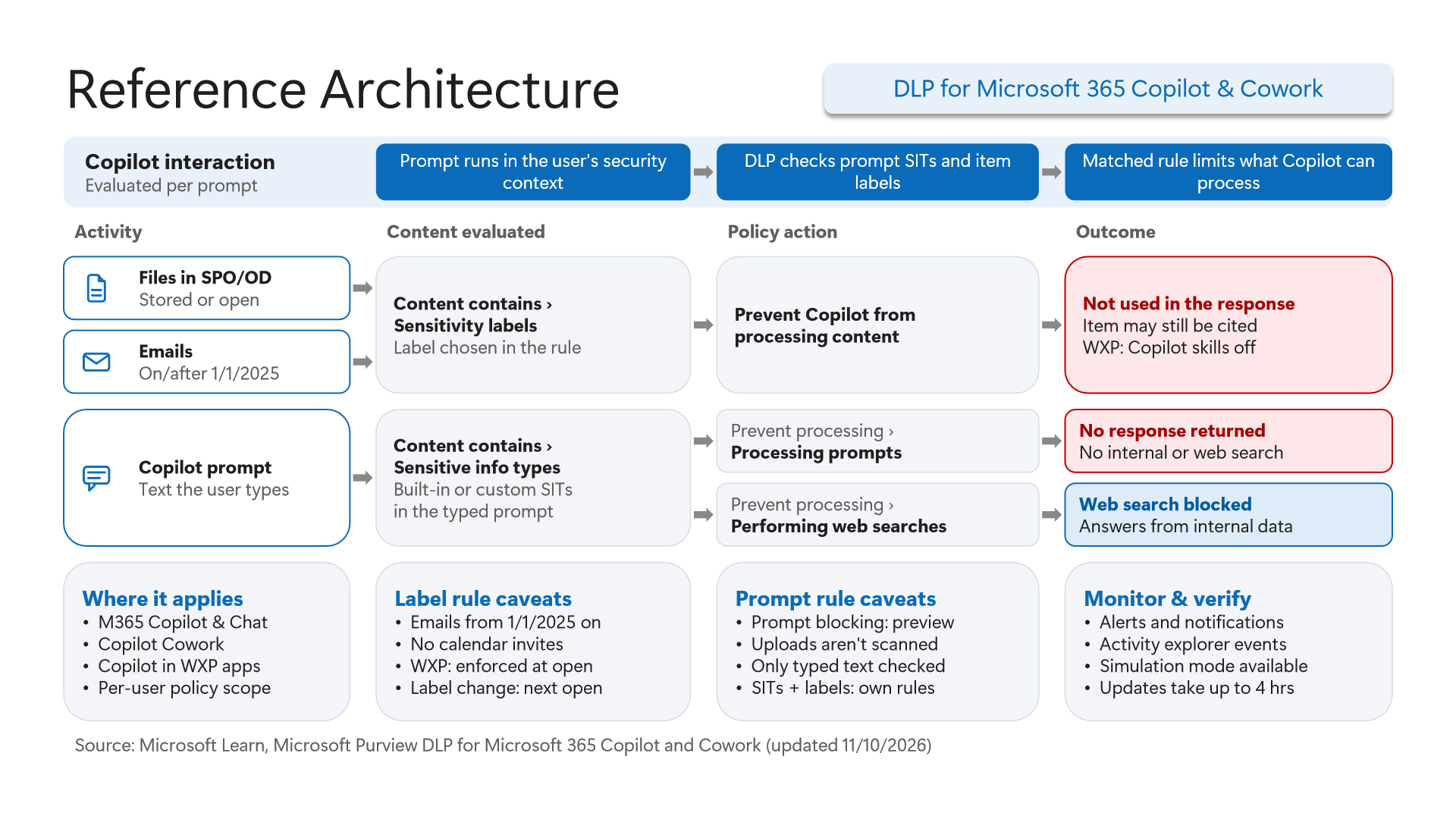
Diagram 16 reflects the architecture updated on 11/10/2026 covering `M365 Copilot & Chat`, `Copilot Cowork`, and `Copilot in WXP apps` (Word, Excel, PowerPoint). Policies apply on a `Per-user policy scope`, support `Simulation mode`, and take `up to 4 hrs` for updates to propagate. Architects must account for five explicit constraints shown on the diagram:
- Email Cutoff (`1/1/2025`), Calendar Exclusions & Persistent Citations: Selecting
Content contains > Sensitivity labelswith `Prevent Copilot from processing content` suppresses content from answers (Not used in the response) and switches off WXP Copilot skills (WXP: Copilot skills off, enforced at open; label changes apply at next open). Critically, scope coversFiles in SPO/ODand `Emails on/after 1/1/2025` only (`older emails and calendar invites excluded`)—and `Item may still be cited`, meaning document titles/references can still surface in citation footnotes! - Two Distinct Prompt `SIT` Verdicts (`Preview`): Matching built-in or custom SITs inside
Copilot prompttext triggers either `Prevent processing > Processing prompts` (No response returned, stopping both internal and web search) or `Prevent processing > Performing web searches` (Web search blocked, still synthesizing answers from internal tenant files). - Uploads Exempt from Prompt Scanning & Rule Separation: Prompt blocking remains in `preview` and checks typed text only—uploaded chat attachments are NOT scanned by prompt rules (`Uploads aren't scanned`)! You must pair prompt rules with sensitivity label DLP rules and Endpoint/Browser DLP (
Part 4&Part 6) to guard file uploads. Additionally, SIT conditions and sensitivity label conditions cannot share a rule (`SITs + labels: own rules`). See Microsoft Purview DLP for Microsoft 365 Copilot: Grounding Exclusion and Prompt Blocking for rule setup walkthroughs.
5. Verification via PowerShell and Defender XDR KQL
Verify SharePoint oversharing settings (Restricted SharePoint Search, RCD, and RAC), active DLP policies in Security & Compliance PowerShell, and mailbox eDiscovery compliance searches cleanly below.
# Prerequisite: Microsoft.Online.SharePoint.PowerShell and ExchangeOnlineManagement modules installed.
# Execution Separation: Inspection commands are read-only; state-changing examples (-WhatIf) must be validated in a pilot group before production rollout.
# 1. Inspect Restricted SharePoint Search, Restricted Content Discovery, and Restricted Access Control settings
Connect-SPOService -Url "https://<tenant>-admin.sharepoint.com"
Get-SPOTenantRestrictedSearchMode
Get-SPOSite -Limit All | Where-Object {
    $_.RestrictContentOrgWideSearch -eq $true -or $_.RestrictedAccessControl -eq $true
} | Select-Object Url, Title, RestrictContentOrgWideSearch, RestrictedAccessControl, RestrictedAccessControlGroups

# 2. Verify Copilot-aligned DLP policies, modes, and active rules in Security & Compliance PowerShell
Connect-IPPSSession
Get-DlpCompliancePolicy | Select-Object Name, Mode, CreationTimeUtc
Get-DlpComplianceRule | Where-Object { -not $_.Disabled } | Select-Object Name, ParentPolicyName, BlockAccess, NotifyUser

# 3. Safely simulate switching a Copilot & Cowork DLP policy into notification-test mode via -WhatIf
Set-DlpCompliancePolicy -Identity "Copilot-Cowork-Label-And-Prompt-DLP" -Mode TestWithNotifications -WhatIf

# 4. Inspect active eDiscovery / Compliance Searches targeting Exchange Copilot prompt storage
Get-ComplianceSearch | Select-Object Name, Status, ContentMatchQuery, ExchangeLocation | Format-Table -AutoSize
Track Copilot DlpRuleMatch triggers alongside uploads landing in OneDrive's `Microsoft Copilot Chat Files` directory via Defender XDR Advanced Hunting (CloudAppEvents).
// Execution Scope: Read-only hunting query (Defender XDR Advanced Hunting / Log Analytics; requires Security Reader role)
// Data Source: Microsoft Defender XDR Advanced Hunting - CloudAppEvents
CloudAppEvents
| where Timestamp > ago(14d)
| where ActionType == "DlpRuleMatch" or ObjectName has "Microsoft Copilot Chat Files" or Application has "Copilot"
| extend Raw = parse_json(tostring(RawEventData))
| extend PolicyName = tostring(Raw.PolicyName),
         RuleName = tostring(Raw.RuleName),
         ObjectId = tostring(Raw.ObjectId),
         UserId = tostring(Raw.UserId)
| project Timestamp, Application, ActionType, UserId, PolicyName, RuleName, ObjectName, ObjectId
| sort by Timestamp desc
6. Licensing, RBAC, and Engineering Limitations
- Licensing: DLP for Microsoft 365 Copilot & Cowork, sensitivity label inheritance, and auto-labeling require Microsoft 365 E5 / Microsoft Purview Suite alongside Microsoft 365 Copilot licensing (select AI data-security/DLP billing options also leverage
PAYG). `RCD`, `RAC`, `DAG`, and Inactive Site Policy require SharePoint Advanced Management (`SAM`) or eligible Copilot entitlements. - RBAC: Managing Copilot DLP policies and
eDiscoveryaudits requiresCompliance AdministratororeDiscovery Manager; administeringRSS,RCD, andRACrequiresSharePoint Administrator. - Limitations: Policy updates require up to `4 hours`, label exclusions skip emails prior to
1/1/2025and calendar invites while still allowing item citations (Item may still be cited), prompt SIT blocking remains inpreviewscanning typed prompt text only (Uploads aren't scanned), and SIT conditions require separate DLP rules from sensitivity label conditions.
Critical Architectural Assessment and Rollback Strategy
- Risks Mitigated vs. Residual Risk Boundary: Copilot DLP, 7-layer oversharing controls, and label inheritance curtail AI over-exposure, yet they do not eliminate the up-to-
4-hourpolicy propagation delay, pre-1/1/2025email/calendar exclusions, residual item citations (Item may still be cited), or uninspected uploaded files underpreviewtext-only prompt SIT rules. - New Dependencies and Production Failure Modes: Governance depends on
RSS/RCD/RACsite boundaries and keepingSITrules separated from sensitivity-label rules. Combining both condition types improperly or omitting SharePoint ACL hygiene exposes over-shared files directly inside Copilot grounding. - Rollback and Pilot Validation Procedure: When Copilot workflows face false-positive blocks, revert Copilot DLP policies to
TestWithNotificationswhile preserving SharePointRCD/RACcontainment boundaries, and verify rule separation within a pilot license cohort.
Microsoft Purview Referential Architecture 8-Part Series Index
- Part 1: End-to-End Architecture & Cause-and-Effect Chain
- Part 2: Classification Engines (`MCE` vs. `DCS`), Label Precedence & Unified Catalog
- Part 3: SharePoint & OneDrive DLP: 6 Scenarios, First Guest Access, `DLP Rule Undo` & `UDP`
- Part 4: Endpoint DLP Internals: `SenseCE.exe`, `File EAs`, 30s JIT & Clipboard Limits
- Part 5: Exchange Transport (`DPS -> DCS -> ETR -> DLP`), Policy Tips & `2M` Partial Scan
- Part 6: Browser DLP, BYOD `Edge Work Profile` & `Entra GSA` Network DLP Configuration
- Part 7: `Collection Policies` Pre-Ingestion Gate, `Insider Risk Management` & Adaptive Protection
- Part 8 (This Article): Microsoft 365 Copilot & Cowork DLP, 7-Layer Oversharing Shield & Storage Mapping
Verified Primary Sources & Open-Source Repositories
This architectural guide was cross-corroborated against the official advisories, Microsoft Learn docs, and open-source PowerShell / KQL repositories below.
- SOURCEtechcommunity.microsoft.com/blog/microsoft-purview-blog/microsoft-pur
- SOURCElearn.microsoft.com/en-us/purview/dlp-microsoft365-copilot-lo
- SOURCElearn.microsoft.com/en-us/purview/ai-microsoft-purview
- SOURCElearn.microsoft.com/en-us/sharepoint/restricted-sharepoint-se
- SOURCElearn.microsoft.com/en-us/sharepoint/restricted-access-contro
Multi-Channel Distribution Summary (X & LinkedIn Draft)
Toggle X (Twitter) & LinkedIn sharing drafts
Multi-Channel Distribution Summary (X & LinkedIn Draft)
Toggle X (Twitter) & LinkedIn sharing draftsWhy does Copilot label DLP exclude pre-1/1/2025 emails & calendar invites, why aren't uploaded attachments scanned by prompt SIT rules, and why might a blocked document still be cited? Purview Architecture Series [Part 8/8 Finale]. #M365Copilot #MicrosoftPurview
In Part 8 (the finale) of our 8-part Microsoft Purview Referential Architecture Series, we analyze Microsoft 365 Copilot & Copilot Cowork: label/encryption inheritance, configuring the 7-layer SharePoint/SAM oversharing stack, all 4 storage addresses, and Copilot DLP rules.