Microsoft Purview Referential Architecture [Part 3/8]: SharePoint & OneDrive DLP — 6 Scenarios, Initial Guest Access Race Window, DLP Rule Undo & July 2025 UDP
Part 3 of the Microsoft Purview Architecture Series dissects all six SharePoint/OneDrive DLP scenarios, why initial guest access creates a brief exposure window, the last-modifier triage trap, SpAccessControl vs. BlockAccess telemetry, DLP Rule Undo storms, and July 2025 UDP indexing.
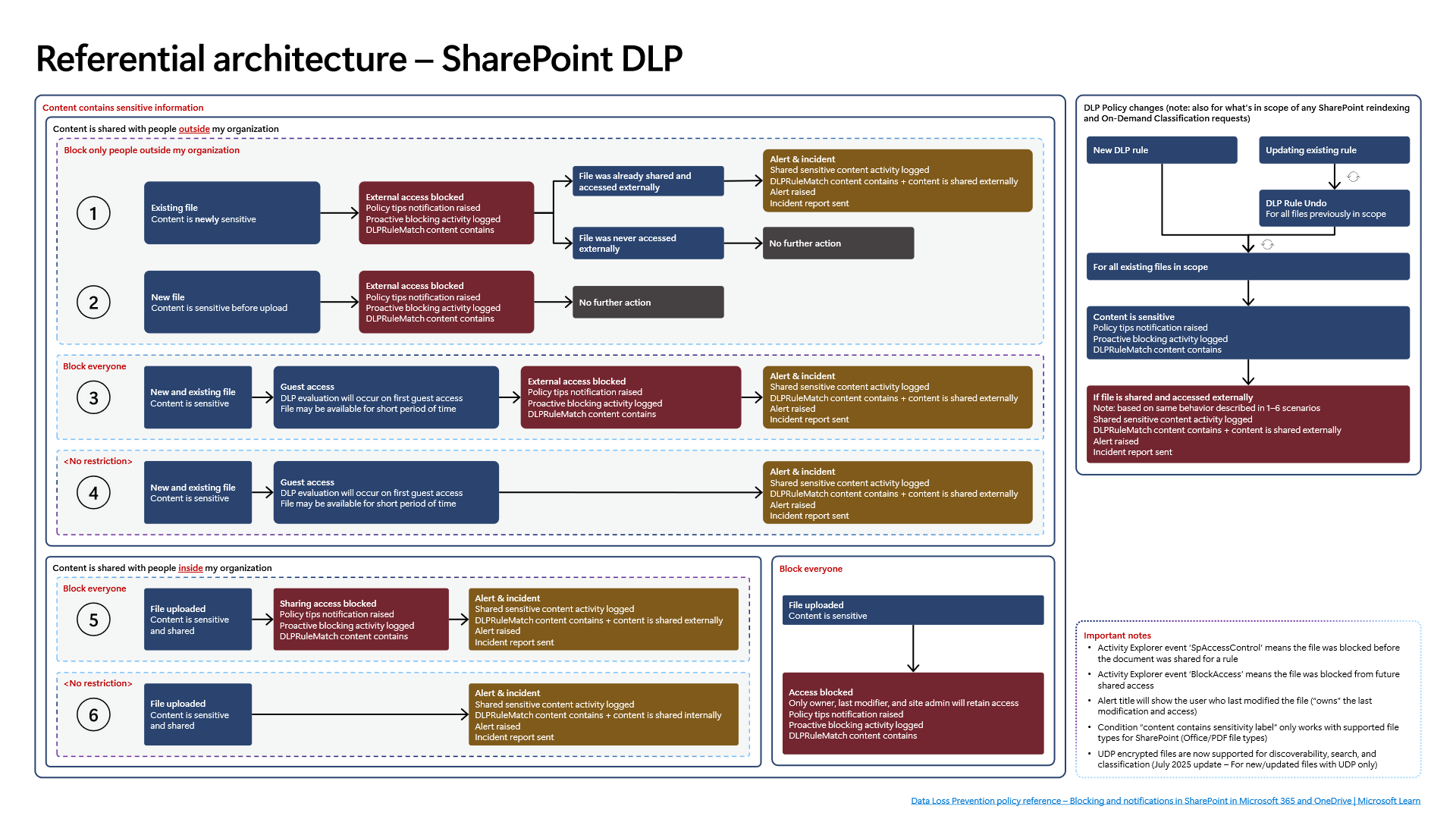
A major share of SaaS data exposure stems from a simple user sequence: uploading a sensitive file into OneDrive or SharePoint and immediately generating an "Anyone" or external guest sharing link. Many security teams assume SharePoint DLP locks a matching document the millisecond it lands in cloud storage—yet Diagram 3 of the Microsoft Purview Referential Architecture reveals a concrete exposure window between asynchronous indexing and initial guest evaluation.
1. Comparing All Six SharePoint DLP Scenarios
Diagram 3 maps six distinct upload-and-share trajectories across SharePoint Online and OneDrive for Business:
- Scenario 1 (No Restriction + Internal Access): Baseline SharePoint permissions govern access without DLP intervention.
- Scenario 2 (Configured Rule / Soft Controls + Internal Sharing Only): Sensitivity matches emit audit records or policy tips while preserving internal workspace access.
- Scenarios 3 and 4 (Unrestricted Baseline or `Block everyone` + External Guest Sharing): Here lies the sharpest timing nuance. If a user shares a sensitive file externally before background crawling/indexing finishes, `Guest access` triggers DLP evaluation on first guest access. Until that real-time check resolves, the document `may remain available for a short period of time` before
External access blockedlocks it down and fires an alert. - Scenarios 5 and 6 (`Block everyone` Corporate Restriction): Once restricted enforcement locks the file, external guests and standard site members lose access immediately; only the file owner, last modifier, and site owner/admin retain access.
2. Hardening Configuration to Close the First Guest Access Window
Because Scenarios 3 and 4 reflect distributed search indexing vs. immediate link creation rather than a broken rule, closing that temporary exposure window requires preventive SharePoint sharing defaults alongside Purview DLP:
- Force `DefaultSharingLinkType` to `Internal`: Eliminate
"Anyone"or tenant-wide guest links as the default link type in SharePoint tenant configuration so hurried users never default to external links. - Enforce Site-Level Sensitivity Labels: Attach container/site sensitivity labels (
Confidential) to sensitive Finance, Legal, HR, and R&D SharePoint sites restricting `External sharing` toOnly people in your organization. Even during indexing lag, guest links cannot be minted on those sites. - Disable Guest Resharing and Mandate Link Expiration: Enforce
PreventExternalUsersFromResharing = $trueand strict anonymous/guest link expiration windows across collaborative sites. - Use `On-Demand Classification` on High-Risk Libraries: After rolling out new SIT definitions, run
On-Demand Classificationor site re-indexing on priority libraries instead of waiting passively for incremental crawls.
3. The SOC Triage Trap: `Last Modifier` Ownership and Event Taxonomy
Diagram 3 highlights a critical forensic detail that routinely sends SOC analysts after the wrong user during incident triage:
- Alert Attribution Shifts to the `Last Modifier`: Under
Block everyone, only the owner, last modifier, and site admin retain access, and the generated DLP alert highlights the last modifier (`"owns"` last modification and access) rather than the original uploader or sharer. If User A uploads and shares an unindexed spreadsheet externally and User B later corrects a typo, the resulting alert centers User B. Always pivot from the DLP alert intoCloudAppEvents/Unified Audit Logrecords (FileUploaded,AddedToSecureLink,SharingSet) to identify who actually exfiltrated or exposed the link. - `SpAccessControl` vs. `BlockAccess` in `Activity Explorer`: Distinguish between `SpAccessControl`, which records proactive access restriction enforced *prior* to sharing (
Scenarios 5–6), and `BlockAccess`, which logs retroactive access blocking enforced against already-shared external access (Scenarios 3–4).
4. Preventing `DLP Rule Undo` Storms and Understanding July 2025 `UDP`
- `DLP Rule Undo` Execution Cost: Editing any existing SharePoint DLP rule forces Purview to run `DLP Rule Undo` (
DLPRuleUndoin audit telemetry) across every previously matched file in rule scope before re-evaluating the repository. Instead of iterating live edits during business hours, clone and validate rule changes in `Simulation mode` first, then schedule cutovers during low-activity maintenance windows. - Office and PDF File Scope for Label Conditions: Inside SharePoint, `content contains sensitivity label` evaluates Office (`Word`, `Excel`, `PowerPoint`) and PDF files only. Text, CSV, archive, or proprietary formats require parallel SIT matching criteria.
- July 2025 `UDP` (`User-Defined Permissions`) Update: Historically, files encrypted with user-defined permissions (
UDP) could not be indexed or scanned at rest by SharePoint DLP. As documented in the July 2025 update on Diagram 3,UDPencrypted files are now supported for discoverability, search, and classification—strictly scoped to newly created or updated `UDP` files (dormant historical UDP files remain unindexed unless modified).
5. Verification via PowerShell and Defender XDR KQL
Verify SharePoint tenant external-sharing defaults, active DLP location scopes, and historical DLPRuleMatch vs. DLPRuleUndo audit events cleanly via PowerShell.
# Prerequisite: Microsoft.Online.SharePoint.PowerShell and ExchangeOnlineManagement modules installed.
# Execution Separation: Inspection commands are read-only; state-changing examples (-WhatIf) must be validated in a pilot group before production rollout.
# 1. Inspect SharePoint Online external-sharing posture and link defaults
Connect-SPOService -Url "https://<tenant>-admin.sharepoint.com"
Get-SPOTenant | Select-Object SharingCapability, DefaultSharingLinkType, DefaultLinkPermission, PreventExternalUsersFromResharing, RequireAnonymousLinksExpireInDays

# 2. Review active DLP policies targeting SharePoint and OneDrive locations
Connect-IPPSSession
Get-DlpCompliancePolicy | Where-Object { $_.SharePointLocation -or $_.OneDriveLocation } | Select-Object Name, Mode, SharePointLocation, OneDriveLocation

# 3. Safely simulate enabling BlockAccess on a SharePoint DLP rule using -WhatIf
Set-DlpComplianceRule -Identity "SPO-Confidential-BlockExternal" -BlockAccess $true -WhatIf

# 4. Query Unified Audit Log for SharePoint DLPRuleMatch vs. DLPRuleUndo events across the last 7 days
Search-UnifiedAuditLog -StartDate (Get-Date).AddDays(-7) -EndDate (Get-Date) -RecordType ComplianceDlpSharePoint -Operations "DLPRuleMatch","DLPRuleUndo" -ResultSize 100 | Select-Object CreationDate, UserIds, Operations
Correlate SharePoint and OneDrive DLP hits, DLPRuleUndo storms, and sharing link creation events in Defender XDR Advanced Hunting via CloudAppEvents.
// Execution Scope: Read-only hunting query (Defender XDR Advanced Hunting / Log Analytics; requires Security Reader role)
// Data Source: Microsoft Defender XDR Advanced Hunting - CloudAppEvents
CloudAppEvents
| where Timestamp > ago(14d)
| where Application in ("Microsoft SharePoint Online", "Microsoft OneDrive for Business")
| where ActionType in ("DlpRuleMatch", "DLPRuleMatch", "DLPRuleUndo", "SharingSet", "AddedToSecureLink")
| extend Raw = parse_json(tostring(RawEventData))
| extend PolicyName = tostring(Raw.PolicyName),
         RuleName = tostring(Raw.RuleName),
         AccessScope = tostring(Raw.SharePointMetaData.SiteCollectionUrl),
         ObjectId = tostring(Raw.ObjectId),
         UserId = tostring(Raw.UserId)
| project Timestamp, Application, ActionType, UserId, PolicyName, RuleName, ObjectId, AccessScope
| sort by Timestamp desc
6. Licensing, RBAC, and Operational Limitations
- Licensing: Core SharePoint/OneDrive DLP runs under Microsoft 365 E3, whereas sensitivity-label DLP conditions, `On-Demand Classification`, `Adaptive Protection`, and full `Activity Explorer` analytics require Microsoft 365 E5 / Microsoft Purview Suite.
- RBAC: Modifying tenant external sharing requires
SharePoint Administrator, while inspecting/managing DLP rules and audit logs requiresCompliance AdministratororInformation Protection Administrator. - Limitations: Unless external sharing is restricted prophylactically at the tenant/site level, initial
Guest accesson unindexed files may expose content briefly beforeBlockAccesscompletes. Additionally, SharePoint label conditions remain restricted to Office and PDF files, and July 2025UDPscanning applies solely to newly created or updated files.
Critical Architectural Assessment and Rollback Strategy
- Risks Mitigated vs. Residual Risk Boundary:
BlockAccessandSpAccessControlcurb external SharePoint and OneDrive exposure, yet they do not eliminate the brief initialGuest accessrace window on unindexed files, label-condition blind spots outside Office/PDF formats, or legacy backlog untouched by July 2025UDPscanning. - New Dependencies and Production Failure Modes: Enforcement latency depends directly on SharePoint search indexing health and baseline site sharing posture. Indexing lag or
DLPRuleUndocontention can briefly leave shared links open or trigger sudden false-positive lockouts across collaborative sites. - Rollback and Pilot Validation Procedure: To recover from unintended site lockouts, relax enforcement with
Set-DlpComplianceRule -BlockAccess $falseorSet-DlpCompliancePolicy -Mode TestWithNotificationsand adjust site posture viaSet-SPOSite -SharingCapability; validate every rule update on a pilot site first.
Microsoft Purview Referential Architecture 8-Part Series Index
- Part 1: End-to-End Architecture & Cause-and-Effect Chain
- Part 2: Classification Engines (`MCE` vs. `DCS`), Label Precedence & Unified Catalog
- Part 3 (This Article): SharePoint & OneDrive DLP: 6 Scenarios, First Guest Access,
DLP Rule Undo&UDP - Part 4: Endpoint DLP Internals: `SenseCE.exe`, `File EAs`, 30s JIT & Clipboard Limits
- Part 5: Exchange Transport (`DPS -> DCS -> ETR -> DLP`), Policy Tips & `2M` Partial Scan
- Part 6: Browser DLP, BYOD `Edge Work Profile` & `Entra GSA` Network DLP Configuration
- Part 7: `Collection Policies` Pre-Ingestion Gate, `Insider Risk Management` & Adaptive Protection
- Part 8: Microsoft 365 Copilot & Cowork DLP, 7-Layer Oversharing Shield & Storage Mapping
Verified Primary Sources & Open-Source Repositories
This architectural guide was cross-corroborated against the official advisories, Microsoft Learn docs, and open-source PowerShell / KQL repositories below.
- SOURCEtechcommunity.microsoft.com/blog/microsoft-purview-blog/microsoft-pur
- SOURCElearn.microsoft.com/en-us/purview/dlp-sharepoint-onedrive-loc
- SOURCElearn.microsoft.com/en-us/purview/dlp-learn-about-dlp
- SOURCElearn.microsoft.com/en-us/sharepoint/turn-external-sharing-on
- SOURCElearn.microsoft.com/en-us/powershell/module/exchange/search-u
Multi-Channel Distribution Summary (X & LinkedIn Draft)
Toggle X (Twitter) & LinkedIn sharing drafts
Multi-Channel Distribution Summary (X & LinkedIn Draft)
Toggle X (Twitter) & LinkedIn sharing draftsWhy can an externally shared SharePoint file briefly open under Block everyone? How does the last modifier alert mislead SOC triage, and why do rule edits trigger DLP Rule Undo? Microsoft Purview Architecture Series [Part 3/8]. #MicrosoftPurview #SharePoint #DLP
In Part 3 of our 8-part Microsoft Purview Referential Architecture Series, we examine SharePoint Online & OneDrive DLP: comparing all 6 upload/share scenarios, closing the initial guest access race window, SpAccessControl vs. BlockAccess, and the July 2025 UDP encryption update.