Microsoft Purview Referential Architecture [Part 4/8]: Endpoint DLP Internals — SenseCE.exe, File EAs Cache, 30s JIT Window & Clipboard/Upload Limits
Part 4 of the Microsoft Purview Architecture Series examines Endpoint DLP engineering: SenseCE.exe extraction, NTFS File EAs caching, the 5m/30m/2h policy sync chain, 30-second JIT protection, hard clipboard limits (4 MB, 2s, 15 chars), and Intune hardening to close Incognito bypasses.
Endpoint DLP (EDLP) is far more than a simple USB port filter—it is a multi-stage inspection architecture combining user-mode text extraction, NTFS extended-attribute caching, cloud classifier fallback, and browser memory buffer interception. Diagrams 4 and 5 of the official referential architecture explain exactly how Endpoint DLP achieves low interactive latency while exposing strict numerical thresholds that teams frequently overlook.
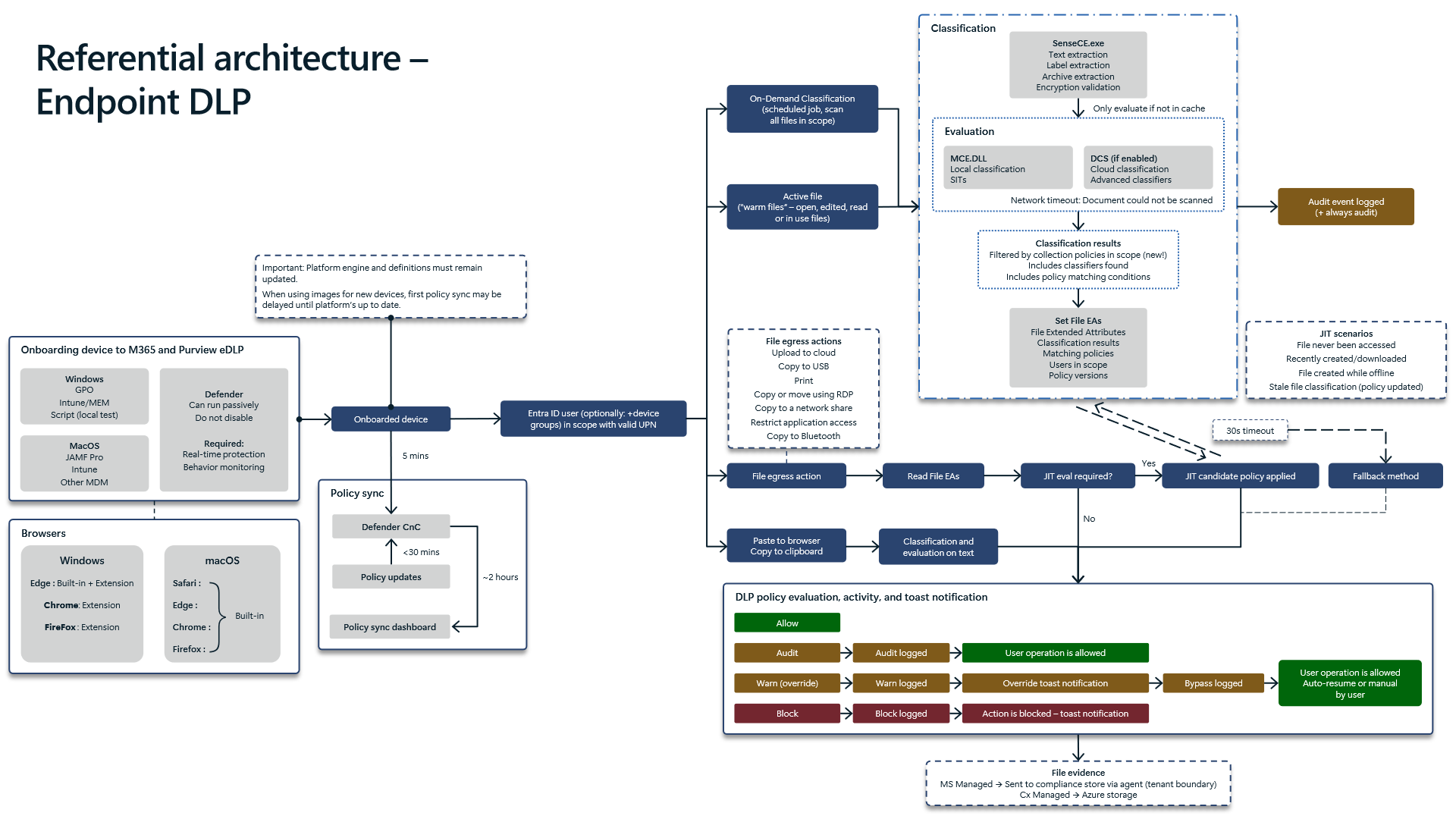
1. `SenseCE.exe`, `File EAs` Attribute Caching, and Policy Sync Timing
Diagram 4 breaks down what occurs on a Windows (or macOS equivalent) endpoint on every open file handle:
- Content Extraction via `SenseCE.exe`: On file handle access,
SenseCE.exeextracts plain text, reads embedded sensitivity labels, unpacks compressed archives, and verifies encryption boundaries. - `MCE.DLL` + `DCS` Filtered by `Collection Policies`: Baseline SIT evaluation executes locally in `MCE.DLL`, calling cloud `DCS` when Advanced Classifiers are in rule scope. Notice the updated dependency highlighted in Diagram 4: classification scope on the endpoint is now governed by active `Collection Policies`. When
DCScannot be reached, Purview falls back to the configuredFallback methodand generates"Document could not be scanned"(+ always audit). - NTFS `File EAs` (`Extended Attributes`) Cache: Once scored, metadata (
Classification results,Matching policies,Users in scope,Policy versions) writes directly onto NTFS `File EAs`. Subsequent egress operations against unchanged content resolve directly from cache without re-running expensive scanners. - Policy Propagation Chain (`5m` -> `< 30m` -> `~2h`) and Gold Image Hygiene: Onboarding completes in
~5 mins, `Defender CnC` delivers updated policy blobs in< 30 mins, andPolicy sync dashboardreporting catches up within~2 hours. Crucially, Diagram 4 warns that imaged devices running stale Defender platform engines and definitions experience delayed initial policy sync. Bake Defender platform and security intelligence updates directly into Autopilot/gold image provisioning sequences. - OS Browser Parity: Windows relies on Edge (
Built-in + Extension) alongside Chrome/Firefox browser extensions, whereas macOS supports Built-in inspection across Safari, Edge, Chrome, and Firefox.
2. How the `30-Second JIT` (Just-In-Time) Protection Window Fires
Whenever an egress attempt touches a file with missing or stale File EAs—specifically files never accessed before, newly created or downloaded files, files authored offline, or files left stale by a policy update—Endpoint DLP triggers `30-second JIT protection`:
- Most Restrictive Candidate Lock: While real-time re-classification runs inside the
30swindow, Endpoint DLP enforces the most restrictive matching JIT policy candidate across candidate scopes. - Timeout Fallback Design: If
DCSevaluation exceeds30 secondson large archives or congested links, the configured `Fallback method` resolves the verdict. For high-sensitivity teams (Finance,Legal,R&D), configure fallback to `Block with override` or `Block` rather than silent audit-only fail-open.
3. Clipboard Copy/Paste & Cloud Upload Boundaries
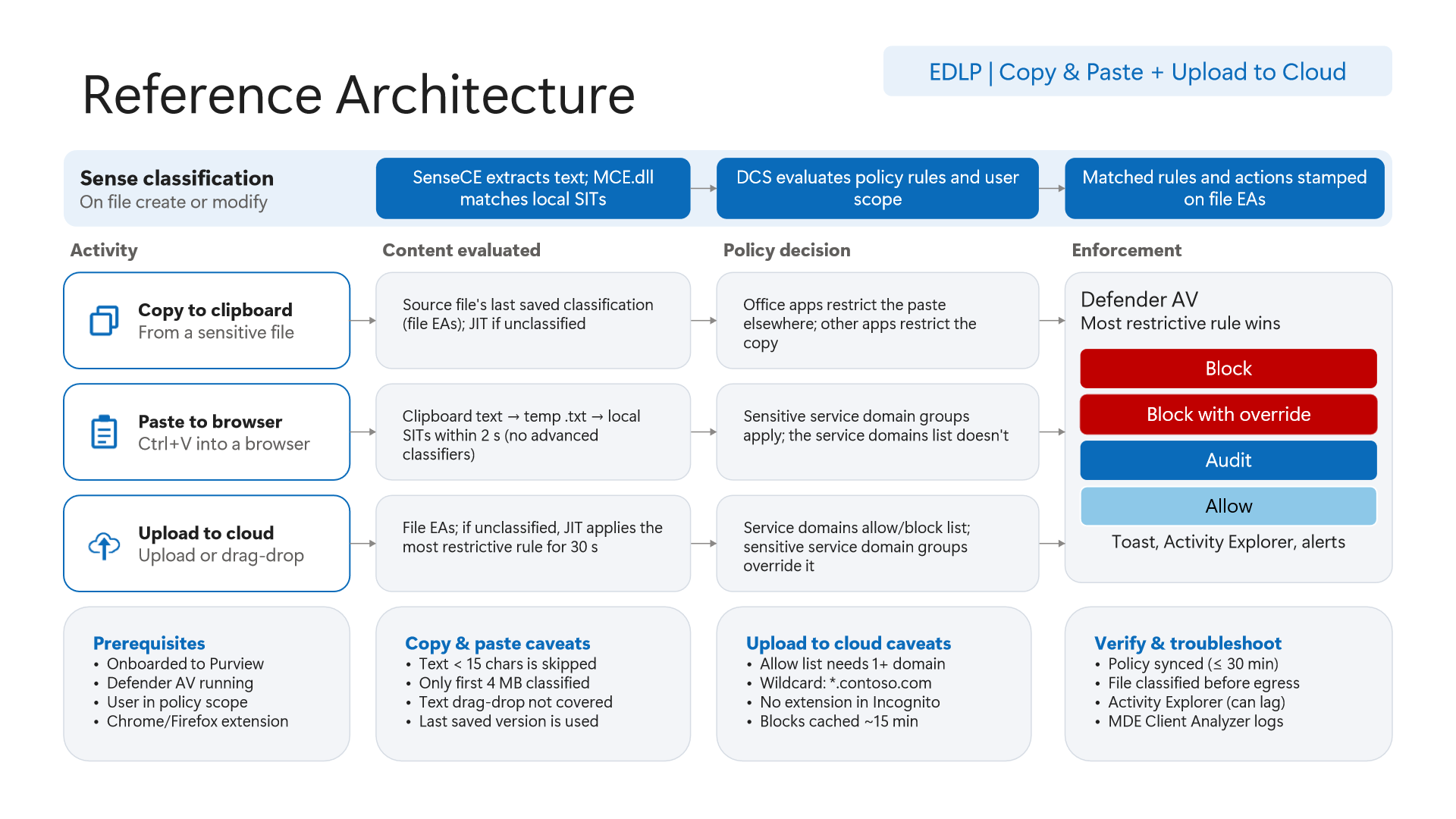
Diagram 5 specifies the exact operational boundaries that red teams test most aggressively:
- `Copy to clipboard` Uses Last Saved `File EAs`: Clipboard copy protection evaluates the file's last saved `File EAs` on disk rather than unsaved keystrokes in memory. Office applications enforce restrictions at destination paste, whereas third-party apps block copy at source.
- Four Hard Clipboard Paste Limits (`2s`, `15 chars`, `4 MB`, `Drag-Drop`): Browser clipboard paste writes content to a temporary
.txtbuffer scanned by local SITs within `2 seconds` (`No advanced classifiers`). Four hard rules apply: payloads `< 15 characters` are skipped, only the first `4 MB` is inspected, text drag-and-drop is not covered, and standard `Service domains list` rules do NOT apply to paste—you MUST populate `Sensitive service domain groups` to govern clipboard paste! - Cloud Upload Caching and the `Incognito` Blind Spot: Allow-list rules require at least one domain (
*.contoso.com), block decisions cache for `~15 minutes`, andSensitive service domain groupsoverrideService domains allow/block list. Most critically: Chrome and Firefox extensions do not run in Incognito windows by default, leaving file uploads unobserved unless enterprise MDM closes private browsing.
Closing the Incognito / InPrivate Bypass via Microsoft Intune
Configure Intune browser policies cleanly across all three major Windows browsers:
- Microsoft Edge (`InPrivateModeAvailability`): Under Intune
Settings Catalog -> Microsoft Edge -> Configure InPrivate mode availability, set value `1` (`InPrivate mode disabled`). - Google Chrome (`IncognitoModeAvailability`): Import Google Chrome ADMX templates into Intune and set
Incognito mode availabilityto `1` (`Disabled`) (or OMA-URI./Device/Vendor/MSFT/Policy/Config/Chrome~Policy~googlechrome/IncognitoModeAvailability). - Mozilla Firefox (`DisablePrivateBrowsing`): Deploy
"DisablePrivateBrowsing": truevia Firefoxpolicies.json(Win32 package) or imported Firefox ADMX policies, and pair withBrowser DLP(Part 6) for unmanaged AI web apps.
4. Verification via PowerShell and Defender XDR KQL
Verify SenseCE.exe sensor health, platform engine currency on workstations, InPrivate registry enforcement, and active EndpointDlpLocation policies safely via PowerShell.
# Prerequisite: Local administrator context for endpoint checks + ExchangeOnlineManagement for Purview checks
# Execution Separation: Inspection commands are read-only; state-changing examples (-WhatIf) must be validated in a pilot group before production rollout.

# 1. Confirm SenseCE.exe is active and inspect Defender engine/signature currency
Get-Process -Name "SenseCE" -ErrorAction SilentlyContinue | Select-Object Name, Id, StartTime
Get-MpComputerStatus | Select-Object AMProductVersion, AMEngineVersion, AntispywareSignatureVersion, AntispywareSignatureLastUpdated

# 2. Verify Edge InPrivate restriction policy (InPrivateModeAvailability = 1) in Windows registry
Get-ItemProperty -Path "HKLM:\SOFTWARE\Policies\Microsoft\Edge" -Name "InPrivateModeAvailability" -ErrorAction SilentlyContinue

# 3. Inspect Purview DLP policies scoped to Endpoint DLP in Security & Compliance PowerShell
Connect-IPPSSession
Get-DlpCompliancePolicy | Where-Object { $_.EndpointDlpLocation } | Select-Object Name, Mode, EndpointDlpLocation

# 4. Safely simulate switching an Endpoint DLP policy into notification-test mode with -WhatIf
Set-DlpCompliancePolicy -Identity "EDLP-USB-And-Clipboard-Block" -Mode TestWithNotifications -WhatIf
Query DeviceEvents in Defender XDR Advanced Hunting to track SenseCE.exe activity, print/clipboard controls, and removable-storage events.
// Execution Scope: Read-only hunting query (Defender XDR Advanced Hunting / Log Analytics; requires Security Reader role)
// Data Source: Microsoft Defender XDR Advanced Hunting - DeviceEvents
DeviceEvents
| where Timestamp > ago(7d)
| where ActionType has_any ("Print", "Clipboard", "File", "RemovableStorage", "Dlp")
| where InitiatingProcessFileName =~ "SenseCE.exe" or ActionType startswith "Dlp"
| extend Fields = parse_json(AdditionalFields)
| project Timestamp, DeviceName, AccountName, ActionType, InitiatingProcessFileName, FileName, FolderPath, Fields
| sort by Timestamp desc
5. Licensing, RBAC, and Engineering Limitations
- Licensing: Endpoint DLP (
SenseCE,File EAs,30s JIT, clipboard/upload enforcement, andCollection Policiesfiltering) requires Microsoft 365 E5 / Microsoft Purview Suite paired with Microsoft Defender onboarding. - RBAC: Policy governance requires
Compliance AdministratororInformation Protection Administrator; browser hardening requiresIntune Administrator. - Limitations: Browser paste inspection is bounded by `2s`, `4 MB`, `>= 15 chars`, `local SITs only`, zero
text drag-dropinspection, non-application ofService domains listto paste, and defaultIncognitoblind spots in Chrome/Firefox unless blocked via MDM.
Critical Architectural Assessment and Rollback Strategy
- Risks Mitigated vs. Residual Risk Boundary:
SenseCE.exe,File EAs, and30sJIT controls restrict unauthorized uploads and removable-media transfers on managed endpoints, but they do not prevent exfiltration from unsaved memory buffers, clipboard payloads under15 charsor above4 MB, text drag-and-drop, or unhardenedIncognitosessions. - New Dependencies and Production Failure Modes: Controls depend on up-to-date Defender anti-malware platform versions, intact NTFS
File EAsmetadata, and Intune browser configurations. Slow storage I/O exhausting the30sJIT budget or stale VDI golden-image engines causes silent fallback or inconsistent enforcement. - Rollback and Pilot Validation Procedure: On endpoint productivity impact, switch
EndpointDlpLocationpolicies back to simulation viaSet-DlpCompliancePolicy -Mode TestWithNotifications, carve out verified process/domain exceptions, and validate browser ADMX restrictions in a staged pilot ring first.
Microsoft Purview Referential Architecture 8-Part Series Index
- Part 1: End-to-End Architecture & Cause-and-Effect Chain
- Part 2: Classification Engines (`MCE` vs. `DCS`), Label Precedence & Unified Catalog
- Part 3: SharePoint & OneDrive DLP: 6 Scenarios, First Guest Access, `DLP Rule Undo` & `UDP`
- Part 4 (This Article): Endpoint DLP Internals:
SenseCE.exe,File EAs, 30s JIT & Clipboard Limits - Part 5: Exchange Transport (`DPS -> DCS -> ETR -> DLP`), Policy Tips & `2M` Partial Scan
- Part 6: Browser DLP, BYOD `Edge Work Profile` & `Entra GSA` Network DLP Configuration
- Part 7: `Collection Policies` Pre-Ingestion Gate, `Insider Risk Management` & Adaptive Protection
- Part 8: Microsoft 365 Copilot & Cowork DLP, 7-Layer Oversharing Shield & Storage Mapping
Verified Primary Sources & Open-Source Repositories
This architectural guide was cross-corroborated against the official advisories, Microsoft Learn docs, and open-source PowerShell / KQL repositories below.
- SOURCEtechcommunity.microsoft.com/blog/microsoft-purview-blog/microsoft-pur
- SOURCElearn.microsoft.com/en-us/purview/endpoint-dlp-learn-about
- SOURCElearn.microsoft.com/en-us/purview/endpoint-dlp-getting-starte
- SOURCElearn.microsoft.com/en-us/deployedge/microsoft-edge-policies
- SOURCElearn.microsoft.com/en-us/powershell/module/defender/get-mpco
Multi-Channel Distribution Summary (X & LinkedIn Draft)
Toggle X (Twitter) & LinkedIn sharing drafts
Multi-Channel Distribution Summary (X & LinkedIn Draft)
Toggle X (Twitter) & LinkedIn sharing draftsWhy does Endpoint DLP skip clipboard strings under 15 characters, ignore text drag-and-drop, and lose visibility in Chrome Incognito? Full internals of SenseCE.exe, File EAs cache & 30s JIT: Purview Architecture Series [Part 4/8]. #MicrosoftPurview #EndpointDLP #Intune
In Part 4 of our 8-part Microsoft Purview Referential Architecture Series, we go inside Endpoint DLP on the workstation: SenseCE.exe execution flow, NTFS File EAs caching, 30s Just-In-Time evaluation, hard clipboard/upload limits, and closing Incognito blind spots via Intune.