Microsoft Purview Referential Architecture [Part 1/8]: End-to-End Cause-and-Effect Chain from Classification to Copilot Cowork
A deep engineering cause-and-effect breakdown of all 16 official Microsoft Purview Customer Excellence Engineering reference architecture diagrams—covering MCE vs. DCS engines, Endpoint File EAs caching, Collection Policies pre-ingestion gates, Insider Risk trigger boundaries, and M365 Copilot & Cowork DLP.
The most common operational misconception in enterprise Microsoft Purview programs is assuming that a data protection gap stems from a "missing DLP rule." In practice, policy blind spots almost always originate from architectural cause-and-effect disconnects: whether client or cloud classification engines evaluate first, how File EAs caching interacts with stale policy updates, how Collection Policies silently drop endpoint signals pre-ingestion before Insider Risk Management (IRM) ever sees them, or which email dates and uploaded files fall outside Microsoft 365 Copilot DLP scope.
This deep dive examines all 16 reference architecture diagrams published by the Microsoft Purview Customer Excellence Engineering team through an end-to-end cause-and-effect lens. Rather than walking through portal menus, we trace what triggers what—from initial content classification and sensitivity label precedence, through SharePoint, Endpoint, Exchange, Browser, and Network DLP enforcement boundaries, all the way into signal ingestion gates, IRM scoring windows, and M365 Copilot & Cowork protection rules.
1. Classification Engines and Labeling Priority Mechanics (`MCE` vs. `DCS`)
Microsoft Purview's entire architecture relies on separating content identification (`Classification`) from policy enforcement (`Sensitivity Labeling` and `DLP`). Detecting "12 credit card numbers" inside a document is strictly a classification signal; preventing external sharing or enforcing encryption requires attaching a sensitivity label (Sensitivity label), retention rule, or DLP policy action. Crucially, where classification runs dictates which classifier families are actually available.
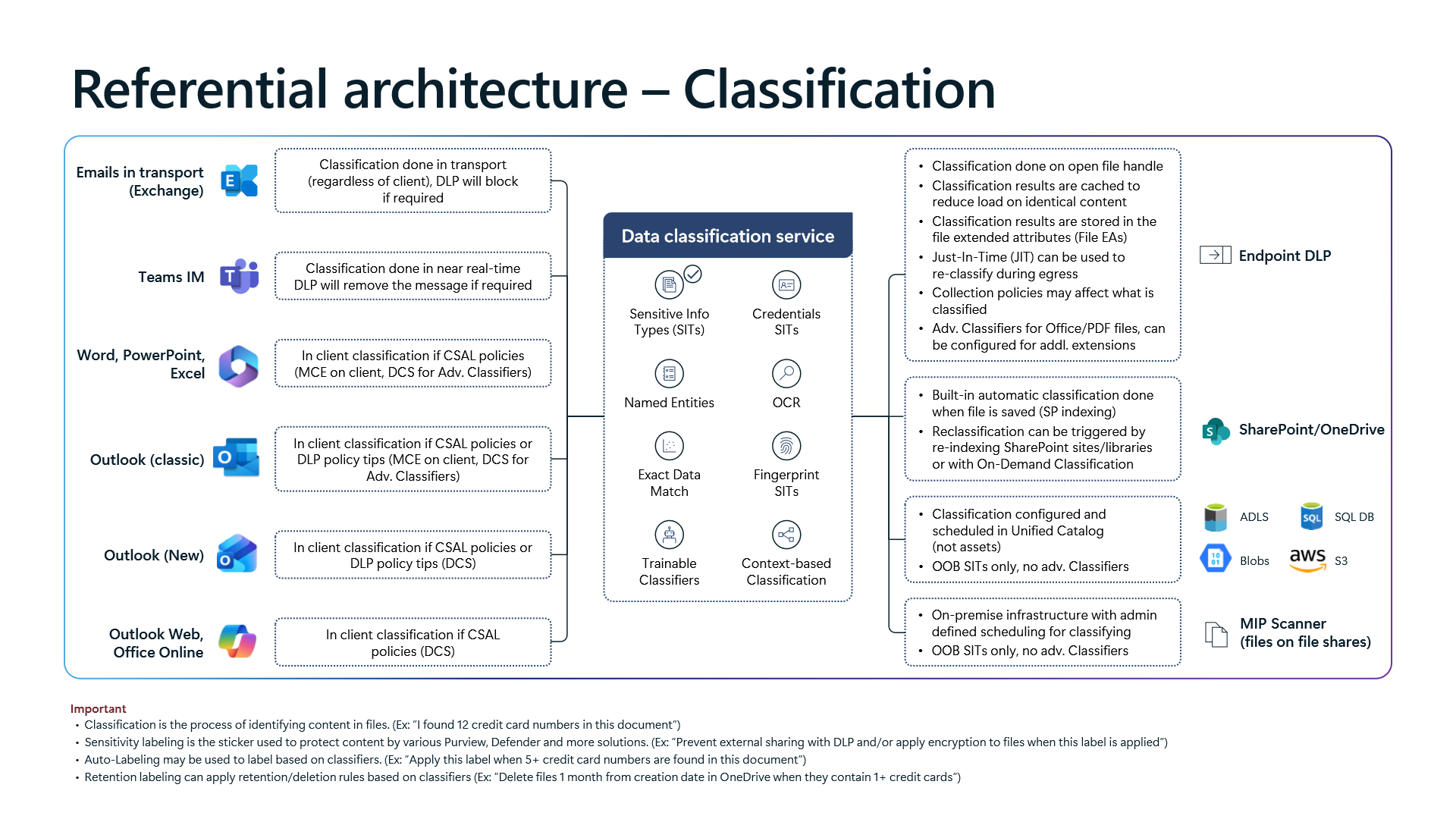
Workload-Specific Classification Routing and Engine Boundaries
The first architecture diagram demonstrates why identical classifier definitions behave differently depending on the workload:
- Desktop Office Apps (`Word`, `PowerPoint`, `Excel`) and `Outlook (classic)`: When client-side auto-labeling (
CSAL) or DLP policy tips are active, primary evaluation executes locally on the endpoint via the Microsoft Classification Engine (`MCE`). Whenever a rule references Advanced Classifiers—such asTrainable Classifiers,Exact Data Match (EDM),Fingerprint SITs,Named Entities,OCR, orContext-based Classification—the client calls the cloud `Data Classification Service` (`DCS`). Consequently, offline or restricted-egress endpoints only match local Sensitive Information Types (SITs). - `New Outlook`, `Outlook Web`, and `Office Online`: These modern clients omit local
MCEprocessing and evaluateCSALand policy tips directly via `DCS`. This unifies rule parity across desktop and web surfaces, at the cost of requiring active cloud connectivity for in-client policy feedback. - Exchange Transport and Teams IM: Exchange classification runs in transport regardless of client (closing gaps from legacy or mobile mail clients), whereas Teams instant messages classify near real-time, removing offending messages immediately after delivery evaluation.
- Unified Catalog (`ADLS`, `Blobs`, `SQL DB`, `AWS S3`) and On-Premises `MIP Scanner`: Diagram 1 highlights an often-overlooked engine boundary: both Unified Catalog data stores (where scanning must be scheduled inside Unified Catalog rather than on individual assets) and on-premises file-share
MIP Scannerinstances support Out-of-the-Box (`OOB`) SITs only—zero Advanced Classifiers. Expecting a Trainable Classifier or EDM schema to classify Azure Storage Blobs or SMB shares produces silent zero matches by design.
Sensitivity Label Precedence and Encryption Decoupling
Once classification completes, the second architecture diagram maps label assignment hierarchy and clarifies a widespread deployment myth regarding encryption.
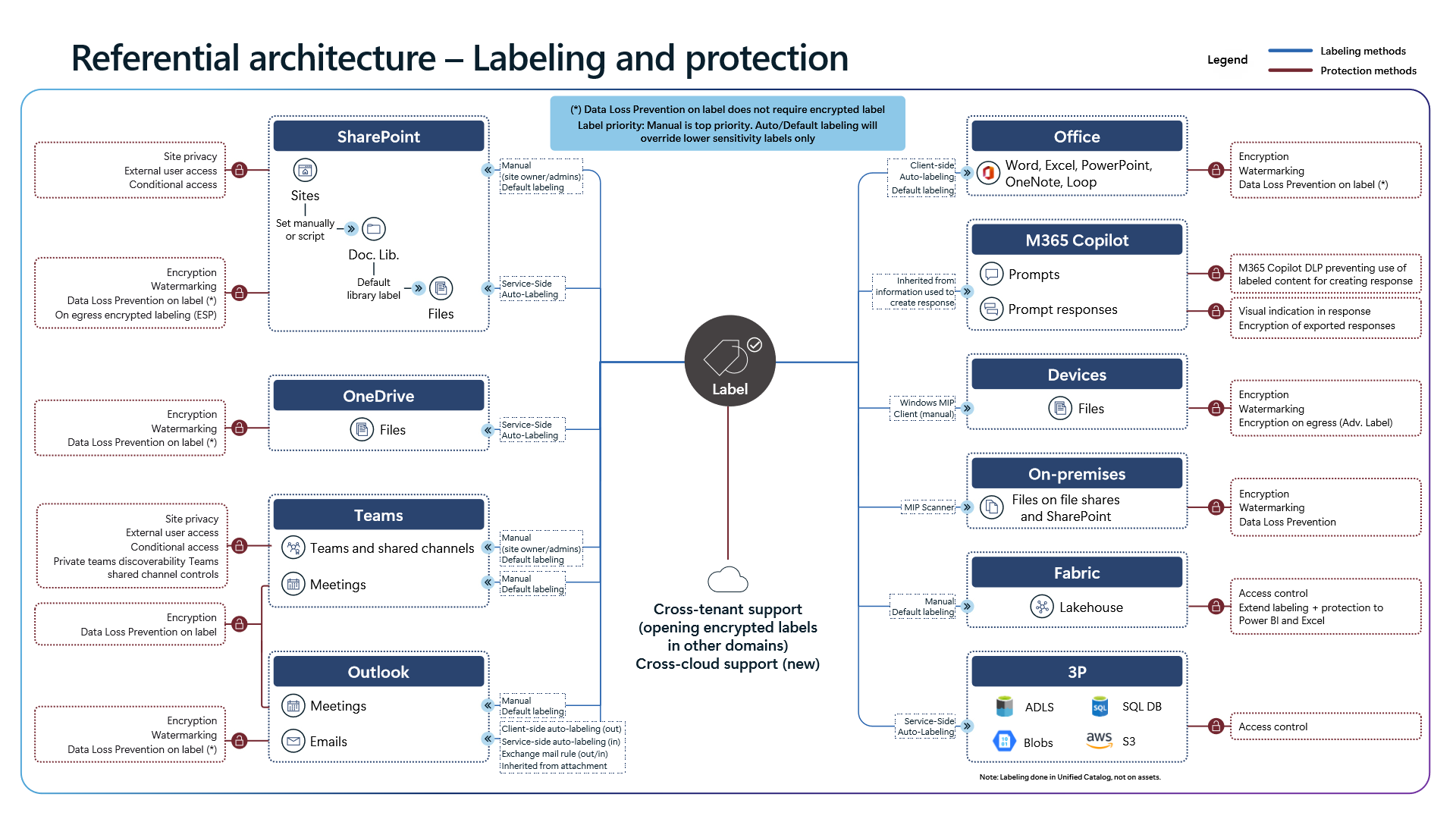
- Label Conflict Hierarchy: A manual label applied by a user carries the highest priority. Both auto-labeling and default-labeling rules may only overwrite lower-sensitivity labels (
Overrides lower sensitivity labels)—they never downgrade a stronger classification already set manually. - DLP Does Not Require Encryption: Diagram 2 explicitly establishes `Data Loss Prevention on label does not require encrypted label`. Organizations do not need to enable RMS cryptographic rights protection on every label simply to block external sharing, constrain Copilot grounding, or enforce Endpoint DLP actions. Reserving encryption strictly for top-tier confidentiality avoids unnecessary disruption to search indexing and automated workflows.
- Cross-Cloud and Unified Catalog Propagation: Protection extends beyond Microsoft 365; sensitivity labels applied at the
FabricLakehouse layer inherit downstream into Power BI and Excel, while Unified Catalog extends label protection toADLS,Blobs,SQL DB, andAWS S3. Encrypted files now support cross-tenant opening and expanded cross-cloud scenarios.
2. Workload DLP Engines: SharePoint, Endpoint DLP, and Exchange Transport
Assuming a DLP policy operates at uniform latency and visibility across SharePoint, Endpoints, and Exchange leads SOC teams to misread incidents. Each workload runs on distinct scanning triggers, attribute caches, and fallback rules.
SharePoint and OneDrive DLP: The Guest Access Window and `DLP Rule Undo`
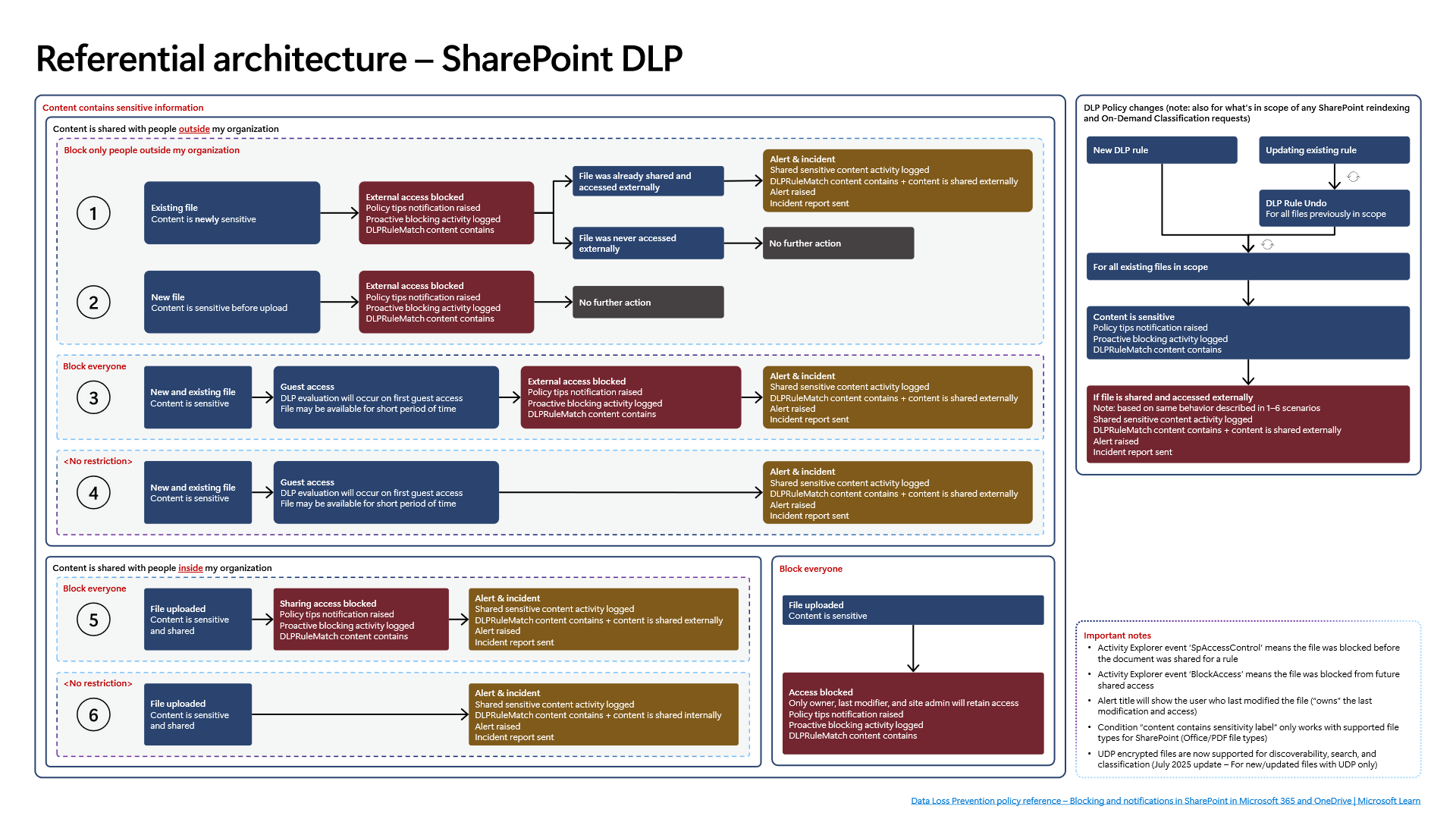
Diagram 3 contrasts six SharePoint/OneDrive upload-and-share scenarios and isolates two subtle operational behaviors:
- Initial Guest Access Race Condition: In Scenarios 3 and 4 (
Block everyoneor unrestricted baseline paired with external sharing before indexing finishes), a `Guest access` attempt triggers DLP evaluation on first guest access. Until that synchronous evaluation completes, the shared file `may remain available for a short period of time` beforeExternal access blockedtakes hold and generates a DLP alert. - The Last Modifier Triage Trap and Event Taxonomy: Under
Block everyone, only the file owner, last modifier, and site owner/admin keep access. Critically, the resulting DLP alert title attributes ownership of the last edit to the last modifier ("owns"last modification and access), which can mislead analysts chasing the original uploader or sharer. InsideActivity Explorer, `SpAccessControl` identifies files blocked proactively prior to sharing, whereas `BlockAccess` records retroactive access revocation on previously shared files. - Rule Edit Overhead and July 2025 `UDP` Support: Updating any existing SharePoint DLP rule forces `DLP Rule Undo` across every previously matched item before re-evaluating the library. Furthermore,
content contains sensitivity labelevaluates strictly Office and PDF files in SharePoint; as noted in the diagram's July 2025 update,UDP(User-Defined Permissions) encrypted files are now supported for discoverability, search, and classification, scoped to newly created or updated UDP-protected files.
Endpoint DLP: `SenseCE.exe`, `File EAs` Caching, and the 30-Second JIT Window
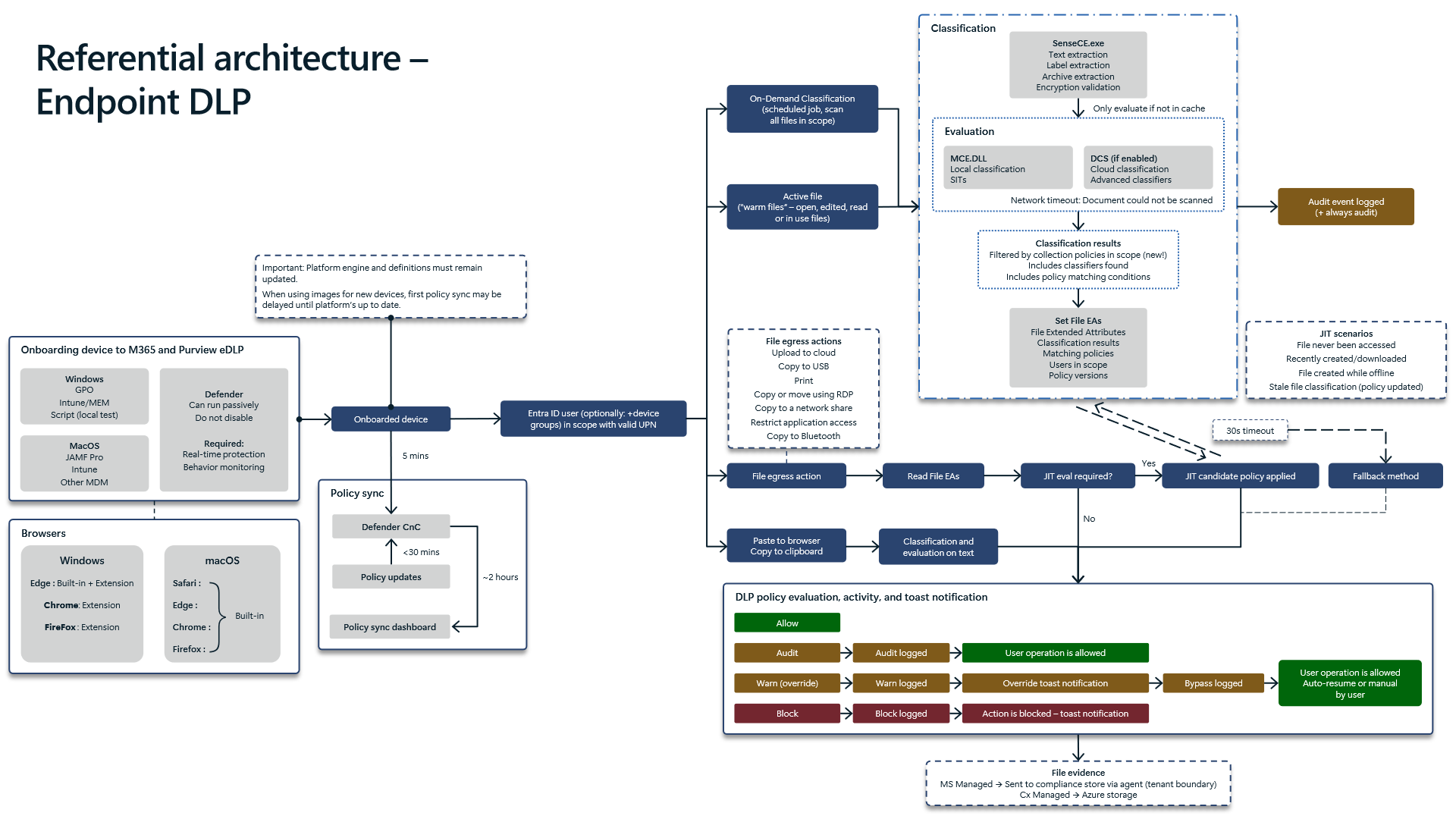
Diagram 4 details how Endpoint DLP evaluates egress actions on Windows and macOS without grinding interactive file operations to a halt:
- `SenseCE.exe` and `File EAs` Attribute Caching: On open file handle events,
SenseCE.exehandles text, sensitivity label, and archive extraction along with encryption checks. It evaluates local SITs in `MCE.DLL` and invokes `DCS` for optional cloud/advanced classifiers—with active `Collection Policies` now filtering what actually enters classification scope. Results (Classification results,Matching policies,Users in scope,Policy versions) are stamped directly onto NTFS `File EAs` (`Extended Attributes`) to cache identical content and skip redundant scans. - Propagation Timeline and Image Hygiene: Policy changes cascade through three checkpoints: device onboarding (
~5 mins), `Defender CnC` delivery (< 30 mins), andPolicy sync dashboardreporting (~2 hours). Keep Microsoft Defender platform engines and security intelligence definitions current on gold images; outdated bits delay initial CnC policy synchronization. For browser coverage, Windows depends on Edge (Built-in + Ext) plus Chrome/Firefox extensions, whereas macOS supports Built-in browser protection across Safari, Edge, Chrome, and Firefox. - 30-Second Just-In-Time (`JIT`) Evaluation: When an egress action targets a file that was never accessed, newly created or downloaded, authored offline, or carries stale
File EAsafter a policy change, Endpoint DLP engages 30-second JIT protection. It enforces the most restrictive matching JIT policy during classification; ifDCStimes out (or network connectivity fails), Purview executes the configuredFallback methodand logs"Document could not be scanned"(+ always audit).
EDLP Copy-and-Paste vs. Cloud Upload: Physical Thresholds That Create Blind Spots
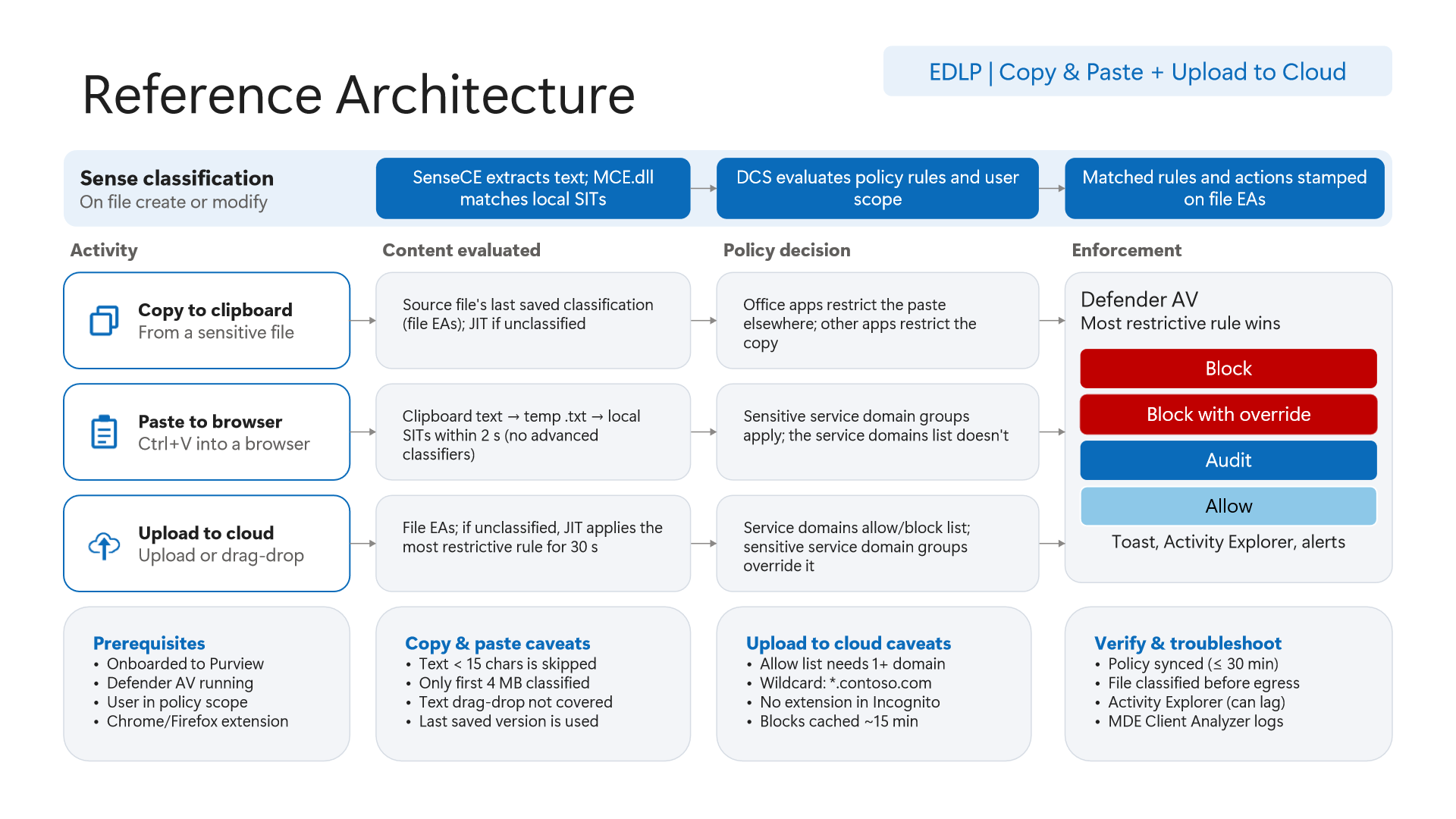
Diagram 5 enumerates the exact numeric limits governing Endpoint DLP clipboard and browser upload inspection:
- Last-Saved `File EAs` on Clipboard Copy:
Copy to clipboardrelies on the file's last saved `File EAs`—unsaved edits in memory are not yet reflected in the extended attribute cache. Office apps block at paste destination, whereas third-party apps restrict the copy action itself. - Four Hard Clipboard Paste Boundaries (`2s`, `15 chars`, `4 MB`, `Drag-Drop`): Pasting into a browser serializes clipboard text into a temporary
.txtfile evaluated strictly by local SITs within `2 seconds` (no Advanced Classifiers). Four exclusions apply: payloads `< 15 characters` are skipped, only the first `4 MB` is classified, text drag-and-drop is not covered, and the standard `Service domains list` does NOT apply to paste—only `Sensitive service domain groups` govern clipboard paste rules. - Cloud Uploads and the `Incognito` Gap: Allow-list configurations require at least one domain (
*.contoso.comwildcard supported), enforcement blocks remain cached for `~15 minutes`, andSensitive service domain groupsoverrideService domains allow/block list. Most critically, Chrome and Firefox extensions do not run in Incognito windows by default; unless enterprise browser policies disable private browsing or force extensions in Incognito, browser upload inspection can be bypassed. For deeper deployment patterns, review our guide on Microsoft Purview Browser DLP, Intune, and BYOD AI Data Protection.
Exchange Transport Rules (`ETR`) and Partial-Scan Resilience
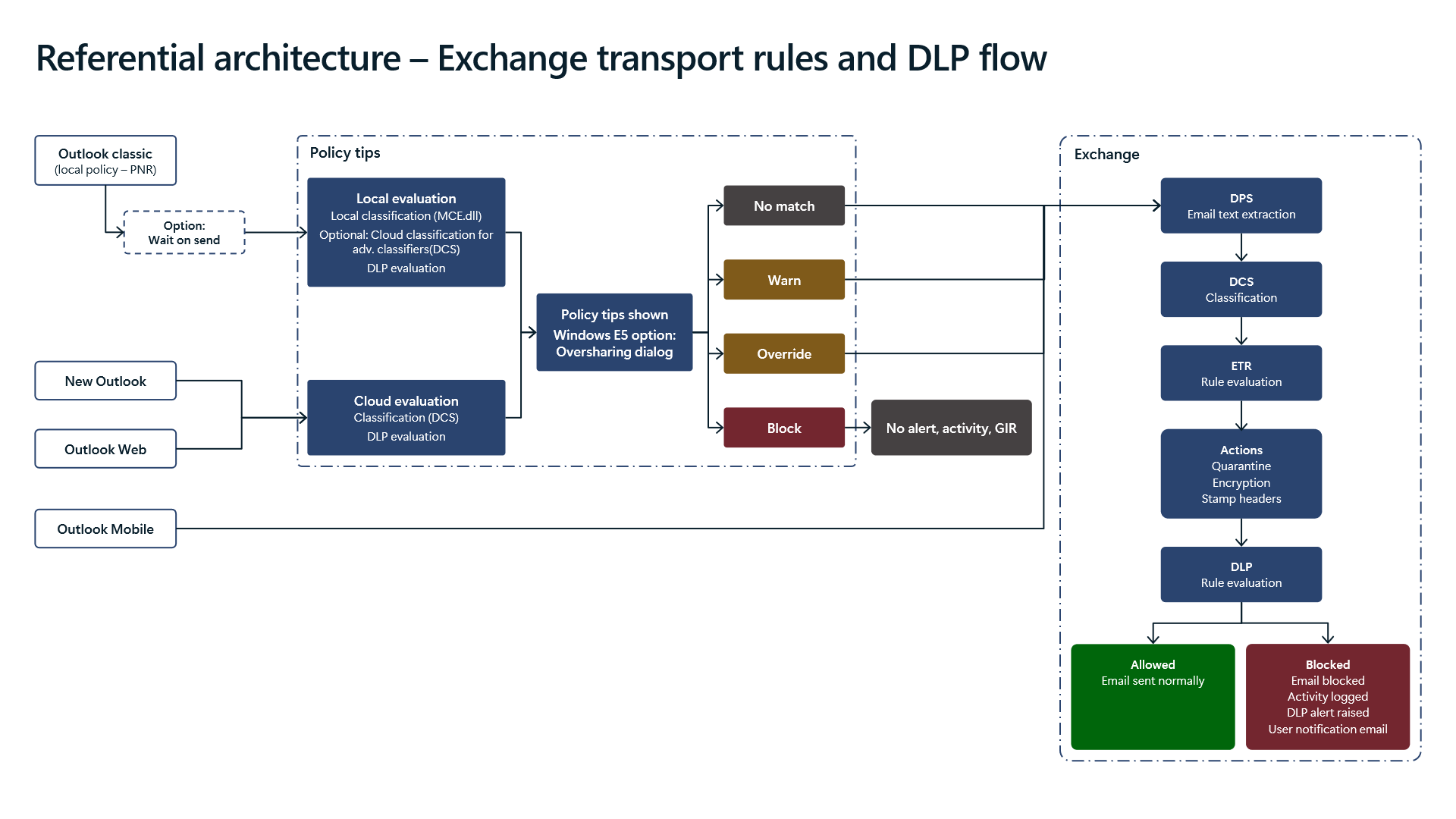
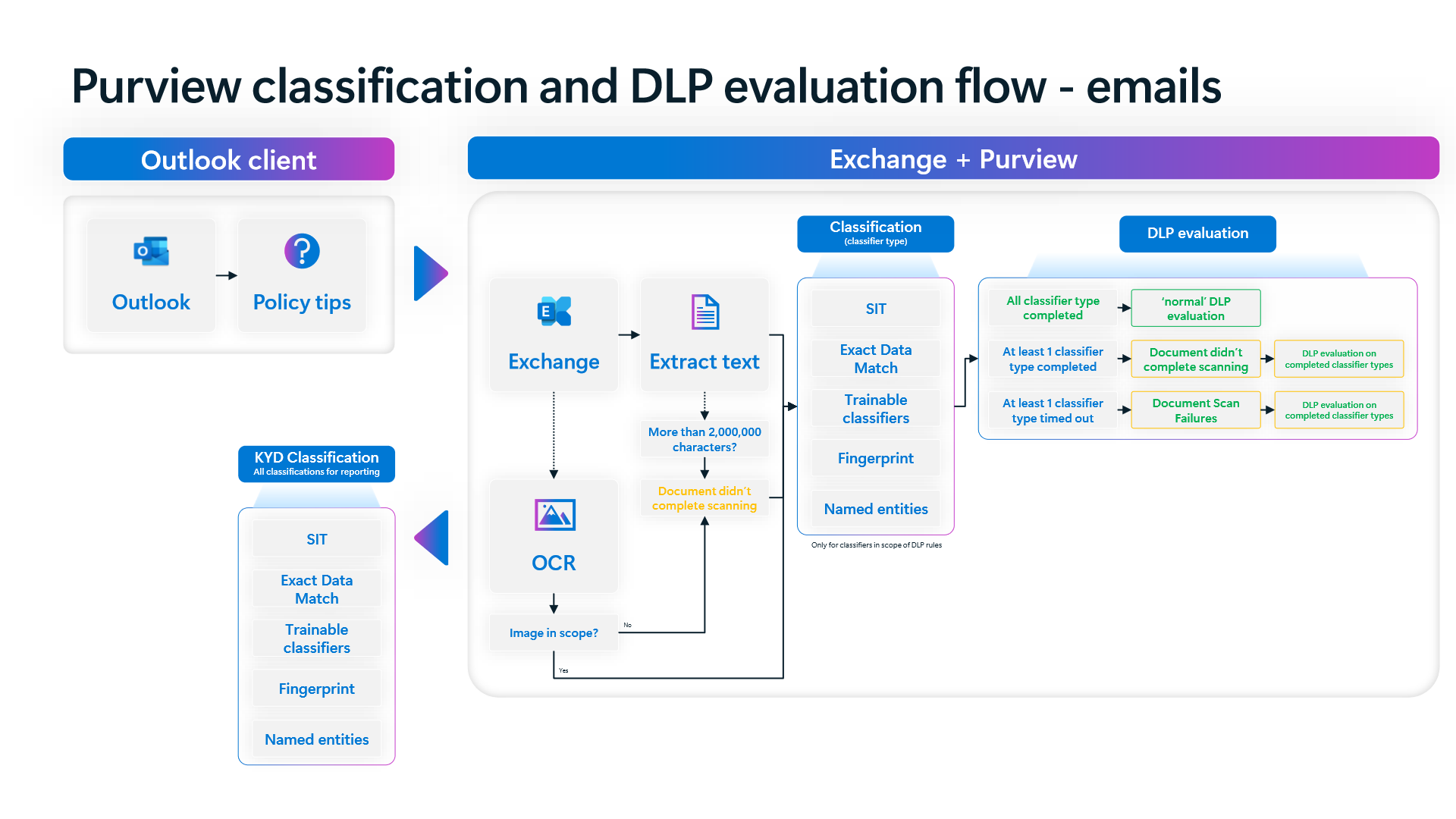
Diagrams 6 and 7 explain two frequently misunderstood Exchange behaviors:
- Why Client Policy Tip `Block` Generates Zero Telemetry:
Outlook (classic)cachesPNRpolicy rules locally (Wait on sendoptional),New OutlookandOutlook Webcall cloudDCS, and `Outlook Mobile` skips Policy Tips entirely, routing directly to Exchange transport. Whenever a desktop Policy Tip (such as Windows E5Oversharing dialog) executes `Block`, the email never reaches Exchange transport—producing `No alert, activity, GIR`. Silence in Activity Explorer often reflects successful pre-send client blocks rather than missing enforcement. - Strict Pipeline Order (`DPS` -> `DCS` -> `ETR` -> `DLP`): Inside Exchange Online transport,
DPSextracts text,DCSclassifies payloads, Exchange Transport Rules (`ETR` — quarantine, encryption, header stamping) execute first, and DLP evaluates last. Custom ETR transformations that alter headers or wrap bodies can directly alter downstream DLP matching. - `2,000,000`-Character Ceiling and Partial Classifier Evaluation: Messages or attachments exceeding
2,000,000characters recordDocument didn't complete scanning(incorporatingOCRwhen images are in scope). Crucially, if one classifier type times out (Document Scan Failures) or aborts while another succeeds, Purview avoids full fail-open by running `DLP evaluation on completed classifier types`. Meanwhile,DLPinvokes *only* classifiers referenced by active rules, whereasKYD Classificationruns *all* classifiers for data discovery telemetry.
3. Dissolving the Network Perimeter: Browser DLP and `Entra GSA` Network DLP
Exfiltration surfaces now span three distinct topologies: consumer AI websites accessed from corporate workstations, M365 web sessions accessed from personal BYOD endpoints, and non-browser native apps or API calls. Diagrams 8, 9, and 10 unify protection across all three.
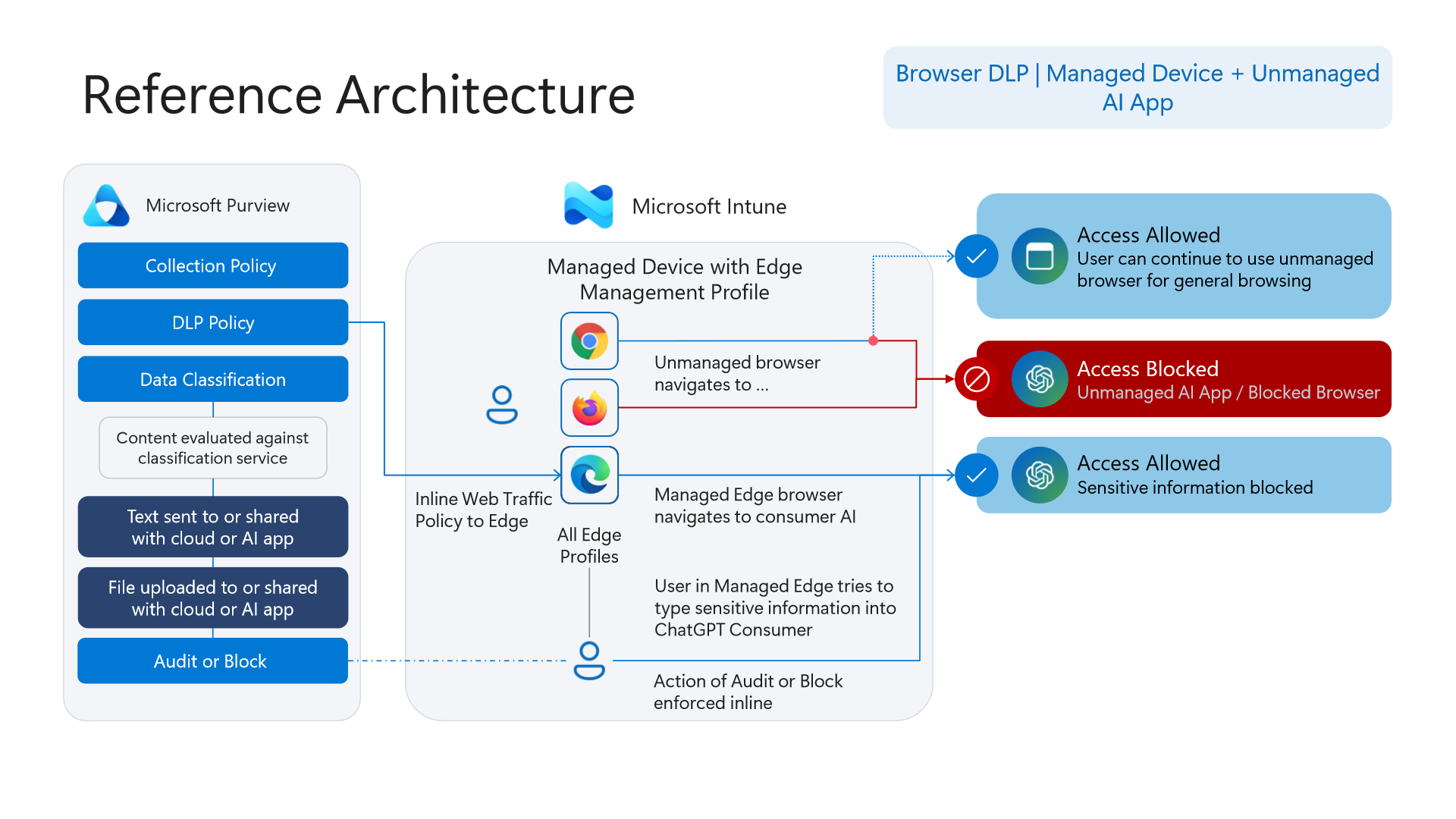
- Managed Device + Unmanaged AI App (Diagram 8): Intune deploys the
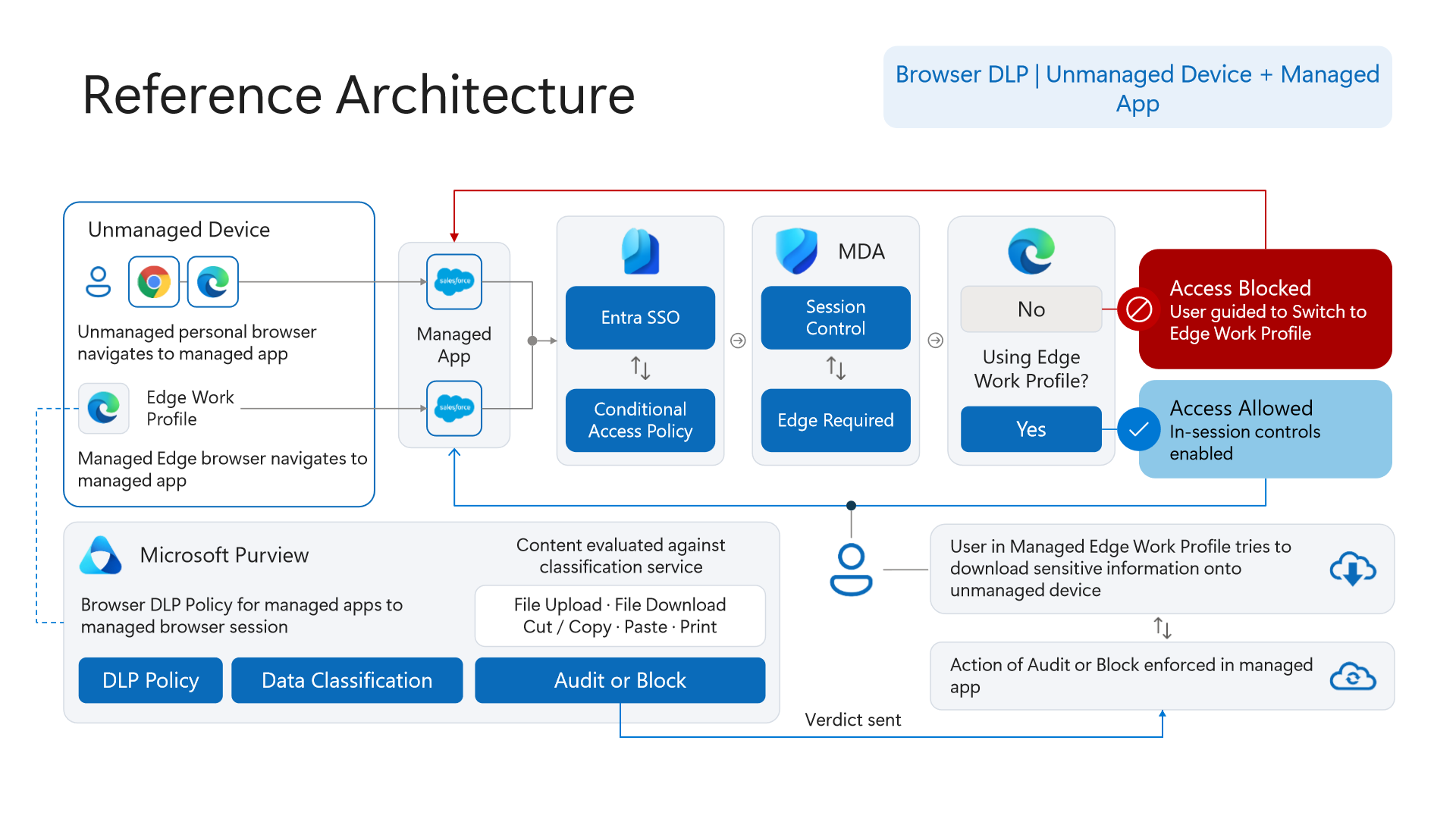
Edge Management Profileand `Inline Web Traffic Policy to Edge`. Non-managed browsers (Chrome,Firefox) remain allowed for general browsing yet are blocked from Unmanaged AI apps, steering AI workflows exclusively intoEdge for Business, where Purview inline DLP allows general AI usage (e.g., ChatGPT Consumer) while auditing or blocking sensitive pastes and file uploads. - Unmanaged Device (BYOD) + Managed App (Diagram 9): Because Endpoint DLP does not run on unenrolled machines, `Entra SSO` -> `Conditional Access` -> `MDA Session Control` -> `Edge Required` intercepts personal browsers at login and prompts the user to switch into an isolated `Edge Work Profile`. Within that work profile, Purview inspects
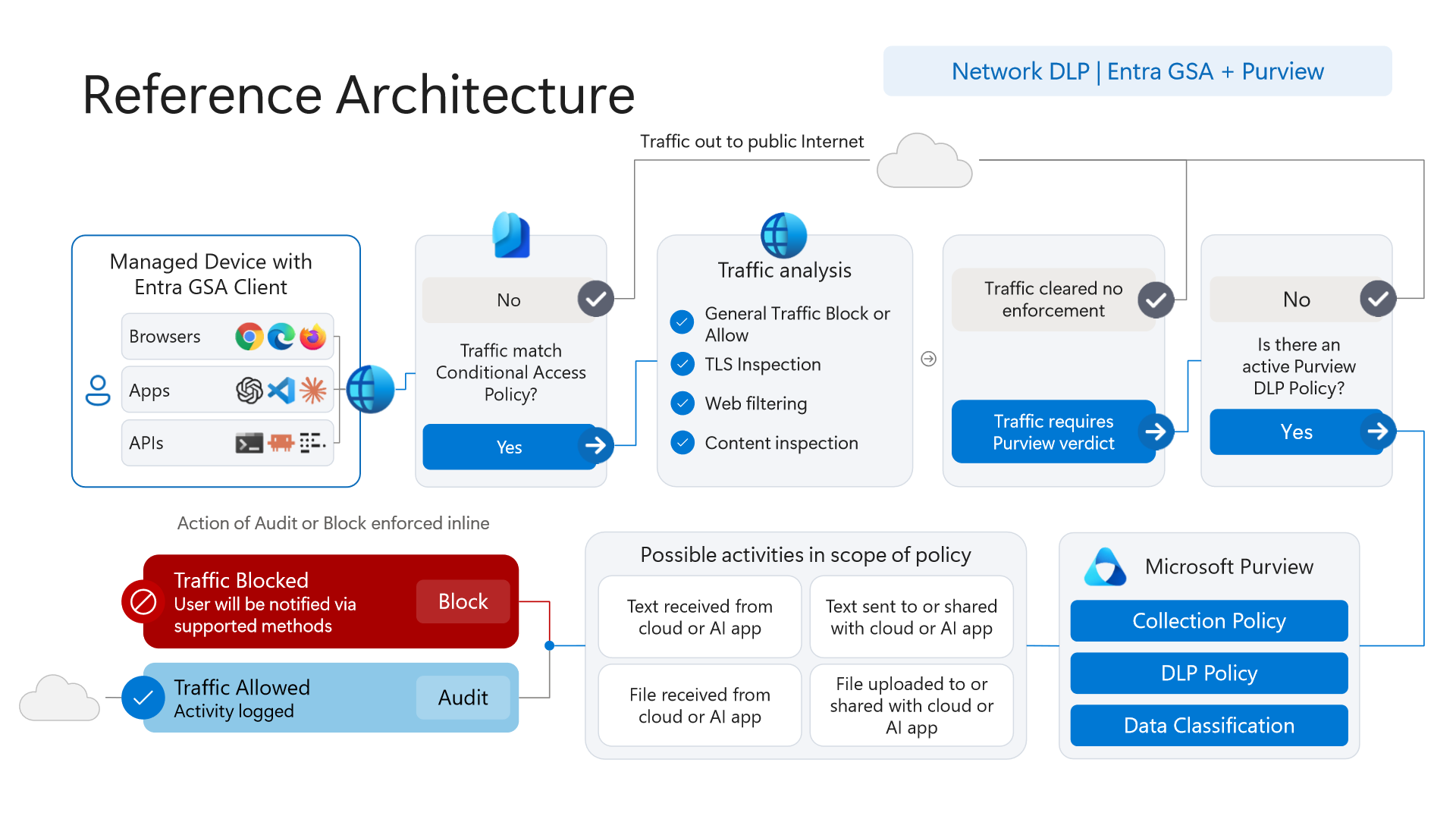
File Upload,File Download,Cut / Copy,Paste, andPrintin-session (Verdict sent: Audit or Block) without requiring MDM device enrollment. - Non-Browser Apps & Bidirectional Network DLP (Diagram 10): Thick clients, developer CLIs, and custom `APIs` bypass DOM browser hooks. `Entra Global Secure Access (GSA) Client` on managed devices captures CA-scoped traffic across
Browsers,Apps, andAPIsinto cloud `TLS Inspection`, Web filtering, and Content inspection governed by activeCollection PolicyandDLP Policydefinitions. Uniquely, inspection operates bidirectionally inline—evaluating both egress (`Text/File sent to cloud or AI app`) and ingress (`Text/File received from cloud or AI app`).
4. Telemetry Funnel Architecture: `Collection Policies` and Insider Risk Management (`IRM`)
The single most damaging cause-and-effect disconnect in Microsoft Purview occurs silently between `Collection Policies` and `Insider Risk Management` (IRM). Enabling every risky-activity checkbox inside IRM does nothing if an upstream Collection Policy drops those events before ingestion.
The Collection Policies Pre-Ingestion Gate (`Event Gate & Filter`)
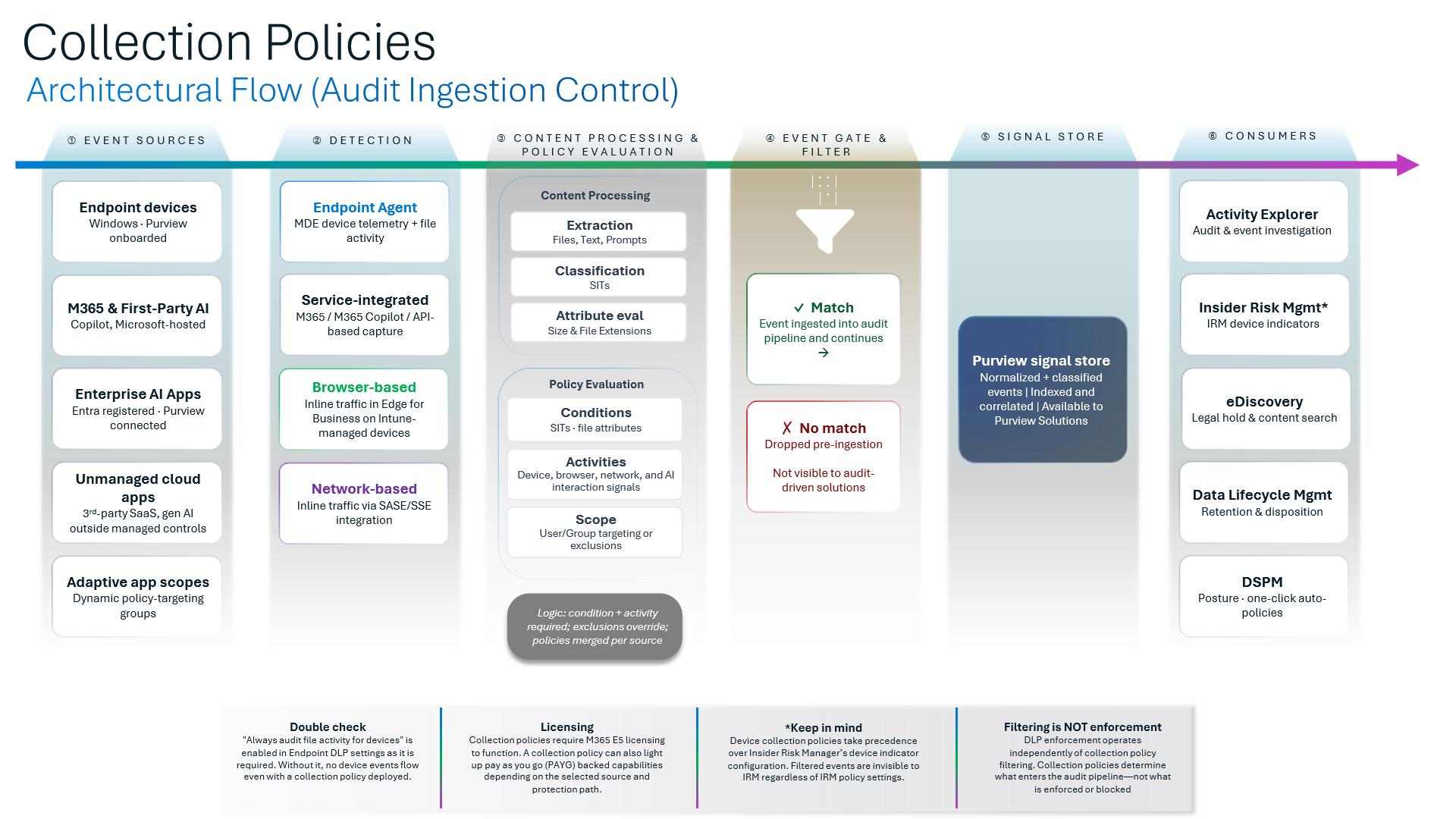
Diagram 11 exposes the six-stage pipeline governing signal ingestion (Event Sources -> Detection -> Content Processing & Policy Evaluation -> Event Gate & Filter -> Purview Signal Store -> Consumers):
- Per-Source Merging and Strict Matching: Policies merge per event source; both condition AND activity must match, while exclusions always override inclusions. Events failing evaluation at Stage 4 are `Dropped pre-ingestion`—making them permanently invisible to downstream consumers (
IRM,DSPM,Activity Explorer, andCommunication Compliance). - Filtering Does Not Equal Enforcement (`Filtering ≠ Enforcement`): Dropping an event inside Collection Policies does not disable Endpoint DLP blocking (
DLP enforcement runs independently); it strictly blinds visibility and risk analytics consumers. - Device Collection Policies Override IRM Indicators: Diagram 11 explicitly warns that device collection policies take precedence over IRM's device indicator configuration. Narrowing endpoint collection scopes starves IRM of USB, print, or cloud-upload indicators even when those checkboxes remain enabled in the IRM portal.
- Mandatory Silent Switch (`Always audit file activity for devices`): `"Always audit file activity for devices"` MUST be enabled inside Endpoint DLP settings—without it, zero device file events enter Stage 1 even when a Collection Policy is deployed. Licensing aligns primarily with M365 E5 (with PAYG pathways depending on consumer workload).
Insider Risk Management (`IRM`): Trigger Gatekeeping and Scoring Windows
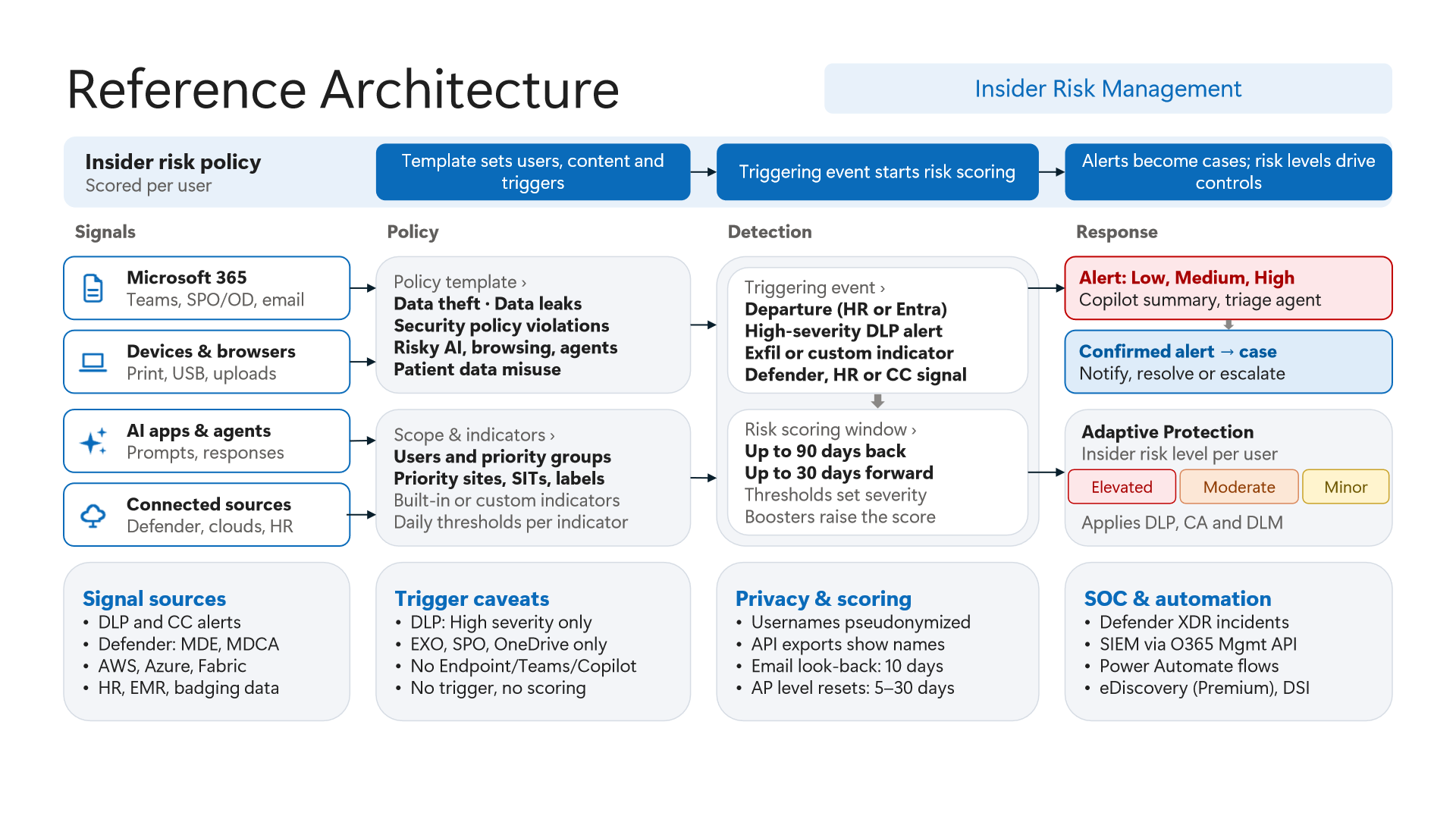
Diagram 12 captures IRM's core operational law: `No trigger, no scoring`. Until an explicit Triggering Event brings a user into policy scope, behavioral indicators accumulate zero risk score.
- DLP Trigger Blind Spots (`High Severity` and 3 Workloads Only): The built-in DLP triggering event fires strictly on `High severity` alerts from `EXO`, `SPO`, and `OneDrive` only. Crucially, `Endpoint DLP`, `Teams`, and `Copilot` DLP alerts DO NOT initiate IRM user scoping on their own! Organizations relying on USB/clipboard or Copilot violations must pair them with
HR Connectorresignation/PIP feeds orM365 Defendertriggers. - Asymmetric Scoring Windows and `Adaptive Protection`: Once triggered, IRM inspects up to `90 days back` and `30 days forward` (
Emaillook-back caps at10 days) to construct behavioral sequence scores, feeding `Adaptive Protection` risk levels (Elevated,Moderate,Minor) back into DLP and Conditional Access for5–30 daysbefore decay resets. - Pseudonymization vs. `API` Exports: Default portal workflows keep usernames pseudonymized in the UI to protect analyst objectivity, yet API exports expose plain usernames—requiring tight RBAC and privacy governance on SIEM/SOAR connectors.
5. Microsoft 365 Copilot & Cowork Governance: Oversharing, Storage, and Current DLP
Generative AI alters zero permissions on its own—Microsoft 365 Copilot executes every prompt strictly `in the user's security context`. When a tenant suffers from years of over-permissive SharePoint links, Copilot simply automates discovery across data the user already held nominal rights to open. Diagrams 13 through 16 define the four defense layers built around Copilot & Cowork.
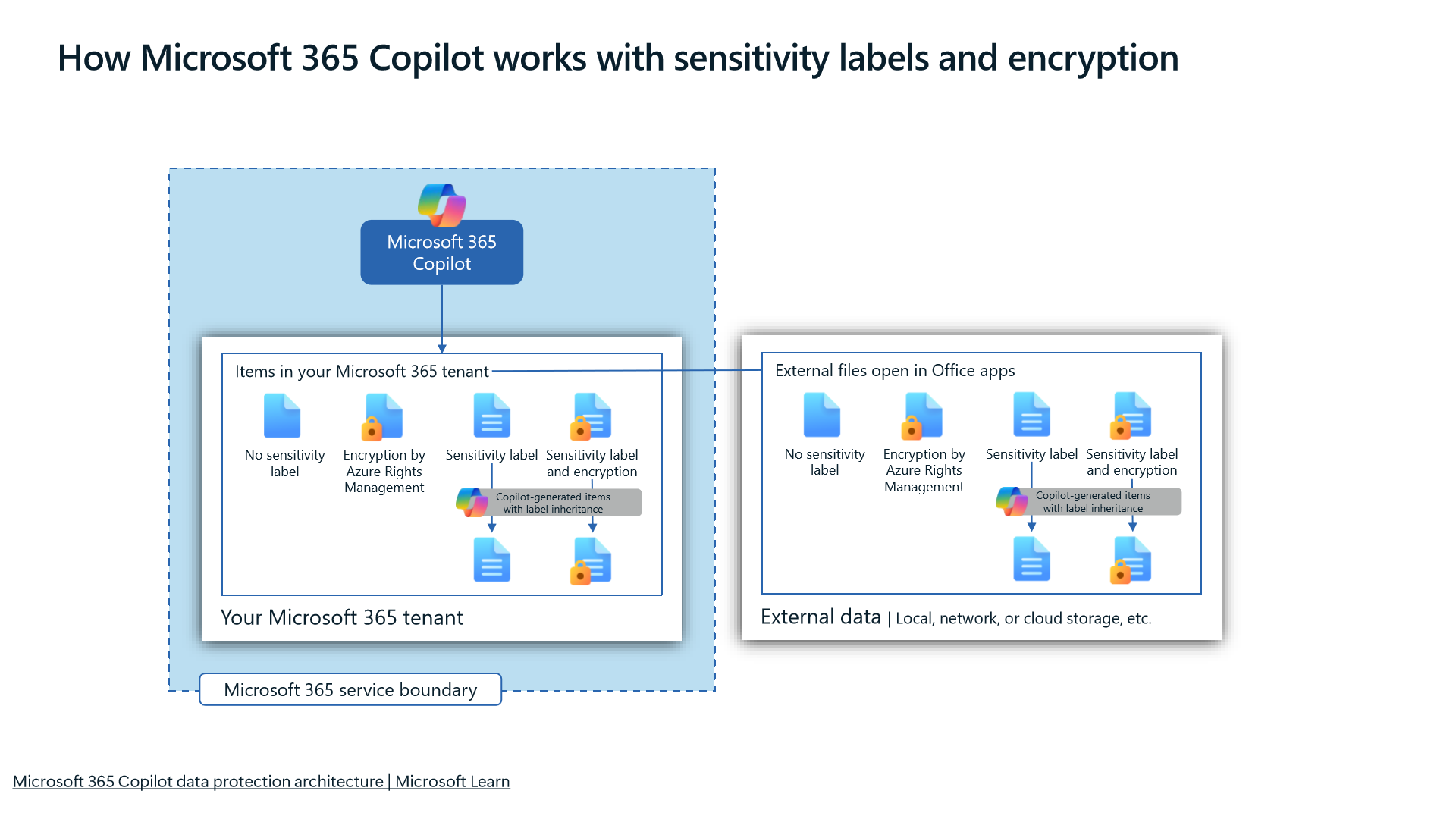
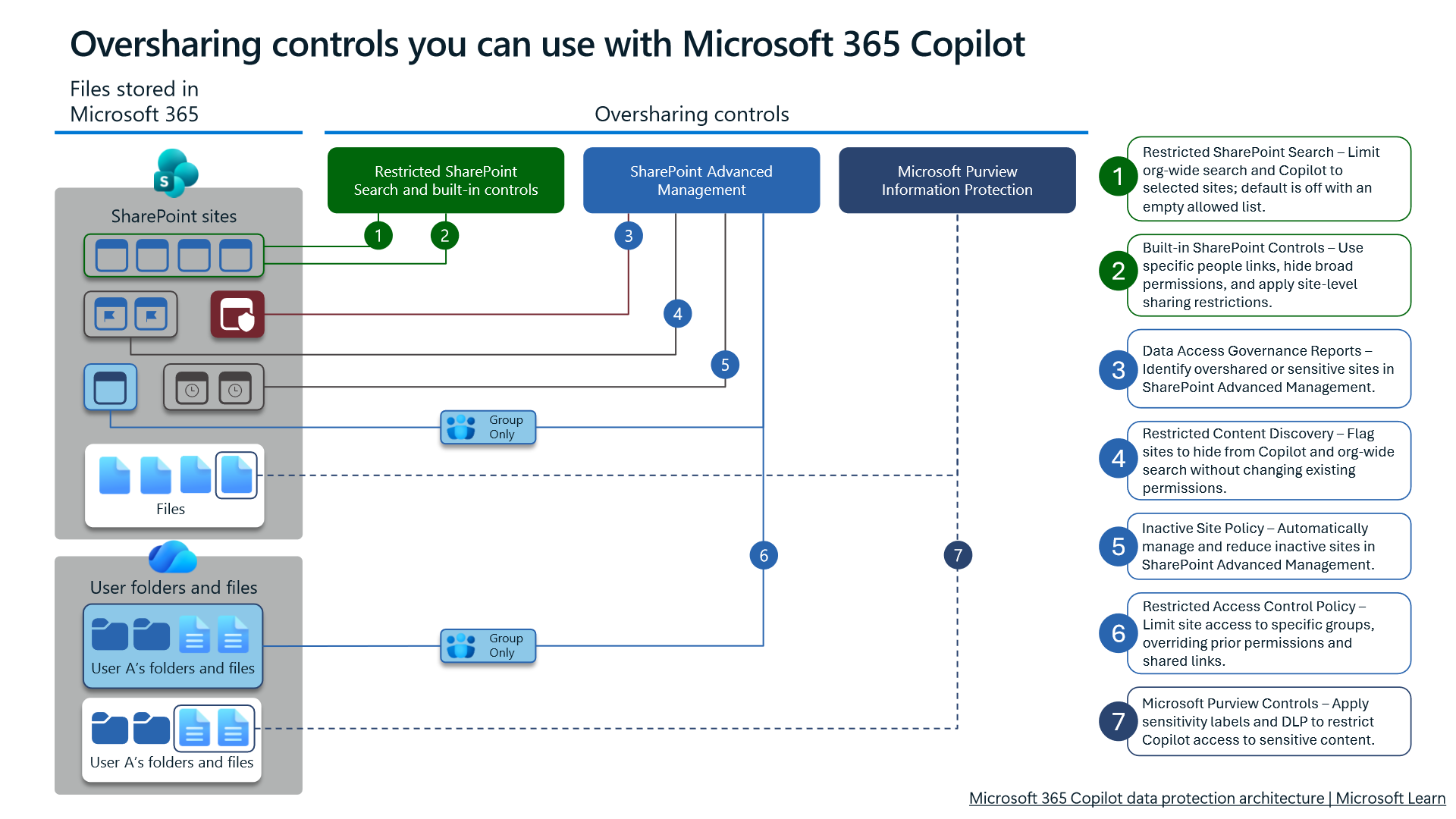
Label Inheritance (`13`) and the 7-Layer Oversharing Shield (`14`)
- End-to-End Label & Encryption Inheritance: Diagram 13 confirms that sensitivity labels and encryption carry forward onto `Copilot-generated items with label inheritance` from both tenant-stored M365 files and external files opened in Office applications.
- Stopping Tenant-Wide Grounding Without Breaking Workflows: Diagram 14 sequences seven progressive controls:
1Restricted SharePoint Search (site allowlist, default off/empty);2Built-in SharePoint permission/sharing controls;3SAM Data Access Governance Reports;4`Restricted Content Discovery`;5SAM Inactive Site Policy;6SAM Restricted Access Control Policy; and7Purview sensitivity labels and DLP. DeployingRestricted Content Discoverysuppresses overshared sites from organization-wide search and Copilot grounding immediately without breaking existing direct links for authorized project members. For step-by-step oversharing remediation, see Microsoft 365 Copilot Readiness: SharePoint Oversharing and SAM Governance.
Physical Storage Mapping (`15`) and Copilot & Cowork DLP (`16`)
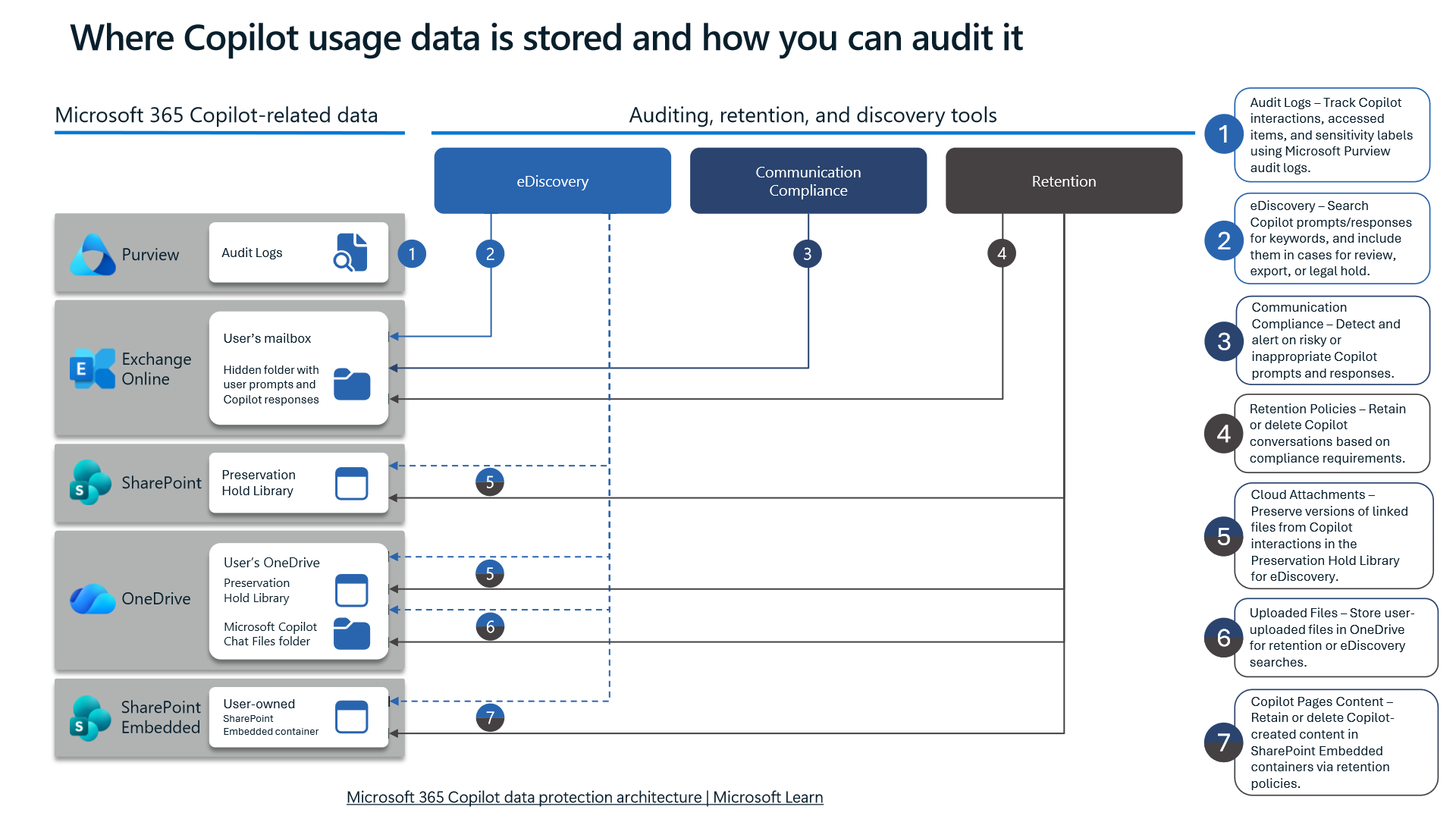
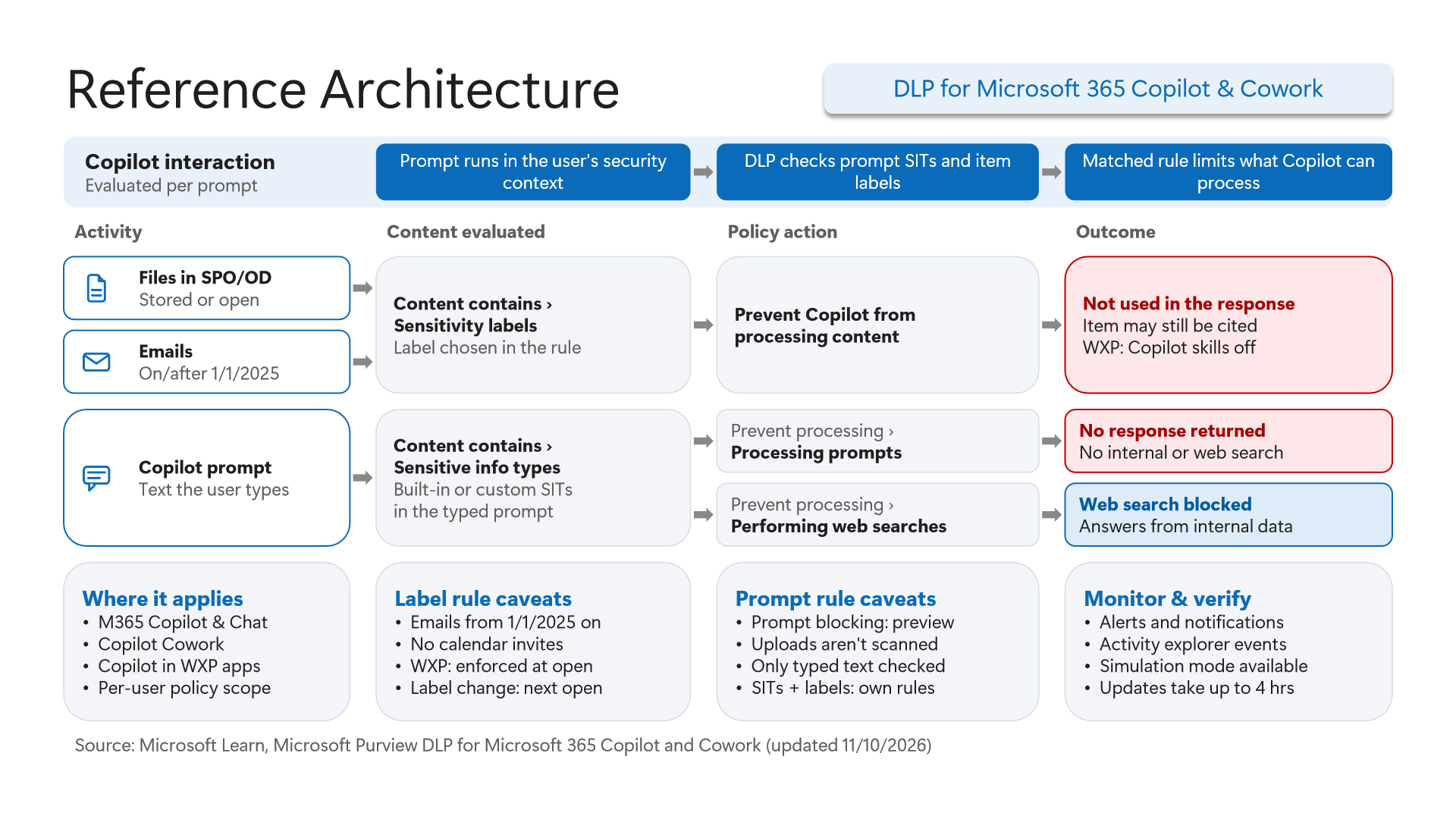
Diagrams 15 and 16 expose physical persistence boundaries and exact DLP caveats updated through 11/10/2026:
- Four Distinct Copilot Storage Locations (Diagram 15): User prompts and Copilot responses reside inside a hidden folder in the user's Exchange Online mailbox—making `eDiscovery`, `Communication Compliance`, and EXO `Retention` your primary audit boundary. Meanwhile, linked cloud attachments route to SharePoint/OneDrive `Preservation Hold Library`, directly uploaded chat attachments store inside the user's OneDrive `Microsoft Copilot Chat Files` folder, and Copilot Pages live inside a user-owned `SharePoint Embedded container`.
- Copilot & Cowork DLP Scope and Rollout Window (Diagram 16): Coverage spans `M365 Copilot & Chat`, `Copilot Cowork`, and `Copilot in WXP apps` (
Per-user policy scope,Simulation mode available, policy updates take `up to 4 hrs` to propagate). Five critical caveats govern real-world behavior: - Date Cutoff & Persistent Citation Caveat: Label-based exclusion (
Prevent Copilot from processing content) protectsSPO/ODfiles and emails sent on/after `1/1/2025` (older emails and all calendar invites are excluded), disables WXP Copilot skills at document open, and picks up label changes on next open. Crucially, even when blocked from response generation, `Item may still be cited`—the item reference can still surface in citations! - Two Distinct Prompt `SIT` Actions (`Preview`): Matching built-in or custom SITs in typed prompts yields either `No response returned` via
Prevent processing > Processing prompts(blocks internal + web retrieval) or `Web search blocked` viaPrevent processing > Performing web searches(halts external search while still answering from internal M365 grounding). - Uploads Exempt from Prompt Scan & Rule Separation: Prompt blocking remains in `preview`, uploaded attachments aren't scanned by prompt rules (`Only typed text checked`), and SIT conditions and sensitivity label conditions require separate DLP rules (`SITs + labels: own rules`). See Microsoft Purview DLP for Microsoft 365 Copilot: Grounding Exclusion and Prompt Blocking for rule-authoring mechanics.
6. PowerShell & KQL Verification, Prerequisites, Licensing, and Limitations
To audit your live tenant against this referential architecture without altering production enforcement, connect to Security & Compliance PowerShell (Connect-IPPSSession) and SharePoint Online Management Shell (Connect-SPOService) using the read-only verification script below.
Prerequisites, RBAC, and Licensing Boundaries
- Required PowerShell Modules:
ExchangeOnlineManagement(forConnect-IPPSSession) andMicrosoft.Online.SharePoint.PowerShell(forConnect-SPOService). - RBAC Roles:
Compliance Administrator,Information Protection Administrator,Insider Risk Management Admin, andSharePoint Administrator. - Licensing Scope: Endpoint DLP, Insider Risk Management, Adaptive Protection, Collection Policies, and DLP for Microsoft 365 Copilot & Cowork typically require Microsoft 365 E5 / Microsoft Purview Suite (select Collection Policies and DSPM flows also support
PAYGbilling; Network DLP requires Microsoft Entra Suite / Entra GSA;SAMgovernance policies require SharePoint Advanced Management or eligible Copilot licensing).
# Prerequisite: Install ExchangeOnlineManagement and Microsoft.Online.SharePoint.PowerShell modules.
# Execution Separation: Inspection commands are read-only; state-changing examples (-WhatIf) must be validated in a pilot group before production rollout.
# Read-only architectural validation via Security & Compliance PowerShell
Connect-IPPSSession

# 1. Inspect sensitivity labels and verify which labels apply encryption inside LabelActions
Get-Label | ForEach-Object {
    $actions = if ($_.LabelActions) { $_.LabelActions | ConvertFrom-Json } else { @() }
    [PSCustomObject]@{
        DisplayName      = $_.DisplayName
        Name             = $_.Name
        Disabled         = $_.Disabled
        ContentType      = $_.ContentType
        HasEncryptAction = [bool]($actions | Where-Object { $_.Type -eq "encrypt" })
    }
} | Format-Table -AutoSize

# 2. Review published label policies, scoping, and enforcement modes
Get-LabelPolicy | Select-Object Name, Enabled, Mode, Settings

# 3. Correlate DLP policy Mode (including Simulation/Test modes) with rule-level BlockAccess actions
foreach ($policy in Get-DlpCompliancePolicy) {
    foreach ($rule in (Get-DlpComplianceRule -Policy $policy.Name)) {
        [PSCustomObject]@{
            PolicyName  = $policy.Name
            Mode        = $policy.Mode
            RuleName    = $rule.Name
            Disabled    = $rule.Disabled
            BlockAccess = $rule.BlockAccess
        }
    }
}

# 4. Audit Insider Risk Management policy status and template types
Get-InsiderRiskPolicy | Select-Object Name, IsEnabled, PolicyTemplate, CreatedDate

# 5. Verify SharePoint sites shielded by Restricted Content Discovery (-RestrictContentOrgWideSearch)
Connect-SPOService -Url "https://<tenant>-admin.sharepoint.com"
Get-SPOSite -Limit All | Where-Object { $_.RestrictContentOrgWideSearch -eq $true } | Select-Object Url, Title, RestrictContentOrgWideSearch
Across runtime detection, monitor CloudAppEvents (ActionType == "DlpRuleMatch") alongside DeviceEvents in Microsoft Defender XDR Advanced Hunting to verify cloud rule hits vs. endpoint SenseCE.exe telemetry.
// Execution Scope: Read-only hunting query (Defender XDR Advanced Hunting / Log Analytics; requires Security Reader role)
// Data Source: Microsoft Defender XDR Advanced Hunting - CloudAppEvents
CloudAppEvents
| where Timestamp > ago(7d)
| where ActionType == "DlpRuleMatch"
| extend ParsedData = parse_json(tostring(RawEventData))
| extend PolicyName = tostring(ParsedData.PolicyName),
         RuleName = tostring(ParsedData.RuleName),
         MatchedSits = tostring(ParsedData.SensitiveInfoTypeData),
         UserId = tostring(ParsedData.UserId),
         Workload = Application
| project Timestamp, UserId, Workload, PolicyName, RuleName, MatchedSits, ActionType
| sort by Timestamp desc// Execution Scope: Read-only hunting query (Defender XDR Advanced Hunting / Log Analytics; requires Security Reader role)
// Data Source: Microsoft Defender XDR Advanced Hunting - DeviceEvents (Endpoint File & Print Telemetry)
DeviceEvents
| where Timestamp > ago(7d)
| where ActionType has_any ("Print", "Clipboard", "File")
| where InitiatingProcessFileName =~ "SenseCE.exe" or ActionType has "Dlp"
| project Timestamp, DeviceName, AccountName, ActionType, InitiatingProcessFileName, FileName, AdditionalFields
| sort by Timestamp descSummary of Architectural Limitations to Account For
- Silent Client Blocks: Mail blocked pre-send via client Policy Tips never enters Exchange transport, creating zero
DlpRuleMatch, alert, orGIRtelemetry. - Endpoint Browser/Clipboard Exclusions: Strings under
15 characters, payloads above4 MB, text drag-and-drop, and default Chrome/FirefoxIncognitosessions bypass standard Endpoint DLP controls unless closed by browser MDM policies orEntra GSANetwork DLP. - Collection Policy Suppression: Overly restrictive
Collection Policiesdrop endpoint signals pre-ingestion and supersede IRM indicator selections, while disabling"Always audit file activity for devices"halts endpoint ingestion entirely. - Copilot DLP Boundaries: Label-based Copilot exclusions omit pre-
1/1/2025emails and all calendar invites, may still render item citations, and prompt SIT blocking (preview) evaluates typed text only—requiring separate label or Endpoint/Browser rules to govern uploaded attachments.
Critical Architectural Assessment and Rollback Strategy
- Risks Mitigated vs. Residual Risk Boundary: Cross-workload Purview orchestration unifies labeling and DLP governance, yet it does not close telemetry blind spots during silent client Policy Tip blocks, clipboard bypasses under
15 charactersor above4 MB, or unmanaged BYOD local storage exfiltration without complementary MDM and network controls. - New Dependencies and Production Failure Modes: Enforcement relies directly on healthy
SenseCE.exeendpoint sensors,DCS/MCEclassification consistency, and accurateCollection Policiesscoping. Overly aggressiveCollection Policiesfiltering or disabled device-activity auditing silently suppresses downstream IRM and Endpoint telemetry in production. - Rollback and Pilot Validation Procedure: Upon false-positive business disruption, immediately revert affected policies to simulation via
Set-DlpCompliancePolicy -Mode TestWithoutNotificationsandSet-AutoSensitivityLabelPolicy -Mode TestWithoutNotifications, validating all scope changes in a pilot ring before re-enabling enforcement.
Microsoft Purview Referential Architecture 8-Part Series Index
- Part 1 (This Article): End-to-End Architecture & Cause-and-Effect Chain
- Part 2: Classification Engines (`MCE` vs. `DCS`), Label Precedence & Unified Catalog Configuration
- Part 3: SharePoint & OneDrive DLP: 6 Scenarios, Initial Guest Access, `DLP Rule Undo` & July 2025 `UDP`
- Part 4: Endpoint DLP Internals: `SenseCE.exe`, `File EAs` Cache, `30s` JIT & Clipboard/Upload Limits
- Part 5: Exchange Transport (`DPS -> DCS -> ETR -> DLP`), Client Policy Tips & `2M` Partial Scan
- Part 6: Browser DLP, BYOD `Edge Work Profile` & `Entra GSA` Bidirectional Network DLP
- Part 7: `Collection Policies` Pre-Ingestion Gate, `Insider Risk Management` & Adaptive Protection
- Part 8: Microsoft 365 Copilot & Cowork Governance: Label Inheritance, 7-Layer Oversharing, Storage & Current DLP
Verified Primary Sources & Open-Source Repositories
This architectural guide was cross-corroborated against the official advisories, Microsoft Learn docs, and open-source PowerShell / KQL repositories below.
- SOURCEtechcommunity.microsoft.com/blog/microsoft-purview-blog/microsoft-pur
- SOURCElearn.microsoft.com/en-us/purview/information-protection
- SOURCElearn.microsoft.com/en-us/purview/dlp-learn-about-dlp
- SOURCElearn.microsoft.com/en-us/purview/endpoint-dlp-learn-about
- SOURCElearn.microsoft.com/en-us/purview/insider-risk-management
- SOURCElearn.microsoft.com/en-us/purview/dlp-microsoft365-copilot-lo
Multi-Channel Distribution Summary (X & LinkedIn Draft)
Toggle X (Twitter) & LinkedIn sharing drafts
Multi-Channel Distribution Summary (X & LinkedIn Draft)
Toggle X (Twitter) & LinkedIn sharing draftsEver wondered why Microsoft Purview policies sometimes seem to bypass silently? I broke down all 16 official reference architecture diagrams into an end-to-end cause-and-effect guide from MCE/DCS and Endpoint File EAs to Collection Policies and Copilot Cowork DLP. #MicrosoftPurview #DLP #M365Copilot
In enterprise Microsoft Purview implementations, failures across DLP, Insider Risk Management, and Microsoft 365 Copilot rarely stem from a missing rule—they happen because of upstream architectural cause-and-effect disconnects. Based on all 16 diagrams from the Microsoft Purview Referential Architecture deck, here is my deep engineering analysis.